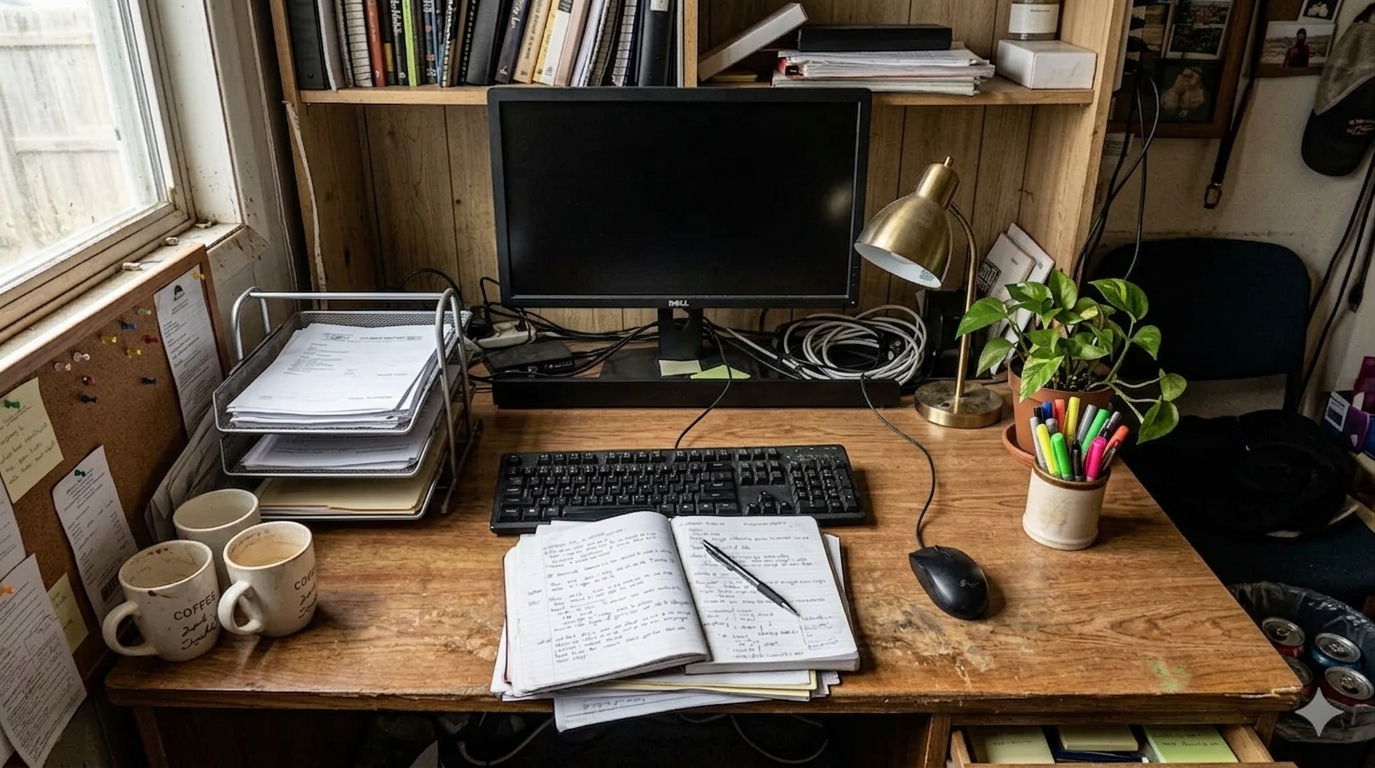
How to Organize a Home Office Desk for Research and Paper Notes Without Losing Work Surface
A research-heavy home office desk gets crowded in a different way than a standard work desk.
The problem is usually not one dramatic mess. It is a buildup of justified items. A notebook stays open because you are still using it. Printed pages stay out because you need to compare them later. A monitor holds the center. A tray of paper starts filling with things to read. Pens, highlighters, chargers, mugs, and reference material spread toward every open edge because each one feels temporary.
That is what many people really mean when they search for ways to organize your workspace or think, “I need to organize my office.” They are not trying to create an empty minimalist desk. They want a home office setup that can support reading, note-taking, and real desk work without making the surface feel permanently overloaded.
TidySnap helps at exactly that point. You can upload a real photo of your desk and turn general advice into a visual plan based on your monitor, notebooks, paper stacks, reading habits, and the zones that keep filling up first.
Quick Answer
If you want to organize a home office desk for research and paper notes, start here:
- decide which area belongs to screen work and which area belongs to reading or note-taking
- keep only one active paper set in the center at a time
- give supporting printouts one contained holding zone instead of several loose piles
- separate reference paper from action paper early
- group pens, markers, and small tools into one side zone
- keep cables and mugs out of the reading path
- reset the desk back to one default layout at the end of the day
For most research-heavy desks, that helps more than adding another organizer.
What People Usually Mean by a Research Desk at Home
A research-oriented desk often has to support several modes of work in the same session:
- screen-based reading or writing
- handwritten notes
- printed reference pages
- comparison between multiple documents
- temporary paper that still needs a next action
That overlap creates a specific kind of clutter. The desk may not look wild, but it starts feeling dense.
You might have:
- one notebook from the current project
- one stack of articles or printouts
- one paper tray with things to read later
- one monitor or laptop setup
- one cluster of pens, markers, and sticky notes
- one mug or water bottle that never quite leaves
None of those is a problem by itself. The friction comes from letting all of them stay equally active.
Why Research and Paper Notes Fill a Desk So Quickly
Paper creates visual noise faster than digital work because it spreads flat.
A printed page can sit under a notebook. A marked-up draft can stay beside the keyboard. A reference sheet can drift below the monitor because you still need it, just not right this second. Soon the desk is doing three jobs at once:
- active work surface
- reference storage
- unfinished reading queue
That is why a research desk often feels harder to use before it looks obviously messy.
Protect the Center for One Work Mode at a Time
The center of the desk should support the task you are doing now, not all the tasks you might do later.
If you are doing screen work, the center usually needs to belong to:
- keyboard and mouse path
- main screen line
- one active note only
- enough open hand space
If you are reading or marking paper, the center usually needs to belong to:
- one active document set
- one notebook or legal pad
- one pen or highlighter
- enough room to turn pages without hitting cables or cups
If you are comparing notes and references, the center usually needs to belong to:
- one active notebook
- one primary reference sheet
- one temporary comparison area
- no unrelated paper underneath everything
| Work mode | What belongs in the center | What should move aside |
|---|---|---|
| screen work | keyboard, mouse, one active note | extra printouts, backup notebooks, paper stacks |
| reading or markup | one active paper set, one pen, open hand space | chargers, mugs, unopened mail, extra stationery |
| note comparison | one notebook, one key reference, one temporary landing area | finished drafts, archive paper, spare tools |
That one rule usually makes a desk feel clearer very quickly.
Split Paper by Role Before It Spreads
A lot of research-heavy desks fail because all paper looks equally important.
It helps to sort it by role instead:
| Paper type | What it means | Better home |
|---|---|---|
| active now | pages you are reading or using this session | center work zone |
| supporting today | pages you still need nearby later today | one side tray or vertical holder |
| reference | useful material you do not need open right now | shelf, file, or off-center holder |
| finished notes | material from completed work | archive folder or drawer |
This matters because a desk gets crowded when finished paper stays dressed up like active paper.
Keep a Reading Zone and a Tool Zone Separate
Research desks often feel messy because every support item gets scattered near the paper.
That usually includes:
- pens
- highlighters
- sticky notes
- clips
- chargers
- headphones
- task pads
- bookmarks or tabs
A better layout is to keep one contained tool zone on one side of the desk. That zone can hold:
- one pen cup or tray
- one highlighter set
- one charging spot
- one small item for clips or tabs
- one closed task pad
The point is not to hide useful tools. The point is to stop them from invading the reading and writing path.
Do Not Let the Monitor Area Become a Paper Shelf
A lot of desks lose clarity because the space below the monitor quietly turns into a storage strip.
That area often collects:
- reference printouts
- sticky notes
- old notes
- envelopes
- charging cables
- the paper you plan to deal with later
The problem is that the area below the screen is visually central. Once it fills up, the whole desk starts feeling busier.
A better default is:
- keep only one current note or one current page near the monitor
- move everything else into the paper holder or side tray
- avoid using the monitor base as general storage
Make Paper Easy to Pause, Not Easy to Spread
Research work often pauses in the middle.
You stop reading one source, switch to the screen, take a quick call, and then come back. If there is no clear pause point, paper stays open everywhere.
That is why it helps to create one visible holding place for paper you are still using today, such as:
- one letter tray
- one upright file holder
- one open folder for current reading
- one clipboard for the top-priority document set
The goal is not perfect filing. The goal is keeping the desk readable between work bursts.
A Better Layout for Common Research-Heavy Desk Setups
Desk used for reading plus computer work
Best approach:
- protect the keyboard zone first
- keep one paper stack beside, not under, the main work area
- use one side tray for supporting reading
- leave enough space to open a notebook comfortably
Desk used for planning, studying, and handwritten notes
Best approach:
- keep one notebook open at a time
- move finished notes into a folder instead of stacking them flat
- group pens and markers into one tool zone
- keep drinks away from the main paper path
Desk used for household admin plus project research
Best approach:
- separate research paper from bills, forms, or mail
- avoid mixing action paper with reference paper
- use one tray for current reading and one folder for admin items
- clear the center before switching tasks
If your main problem is household paperwork rather than research material, read How to Organize Office Paperwork Without Letting It Take Over Your Desk.
Where TidySnap Helps
This is where many people stall. They understand the advice, but when they look at the actual desk they still wonder:
- which paper really needs to stay visible?
- what is making the center feel crowded?
- where should current reading live between sessions?
- which tools are useful, and which ones are just taking up edge space?
- how much of the desk is acting like storage instead of workspace?
TidySnap helps from a real photo of your home office desk. It can help you:
- identify overloaded paper zones
- separate active reading from background reference material
- protect the center for the task you are doing now
- spot cables and small tools that interrupt the writing path
- create a reset target you can actually repeat tomorrow
A 12-Minute Reset for a Research-Heavy Desk
| Minute | Action | Goal |
|---|---|---|
| 0-2 | remove cups, trash, and obvious non-work items | cut fast visual noise |
| 2-4 | gather loose paper into one review point | stop paper from hiding across the desk |
| 4-6 | separate active now, supporting today, reference, and finished notes | reduce decision overload |
| 6-8 | move non-active paper into one tray or holder | restore the center surface |
| 8-10 | return pens, markers, and clips to one tool zone | reduce edge clutter |
| 10-12 | leave tomorrow’s first note or reading set visible only | make restart easier |
Common Mistakes
The most common mistakes are:
- keeping multiple paper sets open at once
- letting finished notes stay in the active area
- parking paper below the monitor line
- scattering pens and markers across the full desk
- mixing research material with bills, receipts, or unrelated admin paper
- treating the whole desk like an open reading queue
Final Takeaway
If you want to organize a home office desk for research and paper notes, the goal is not to make the desk look empty. The goal is to make the work surface easier to read.
That usually means one active paper set, one protected center, one support zone for tools, and one holding place for reading you are not using right this second.
And if you want help turning your own paper-heavy desk into a clearer visual plan, TidySnap can turn one real workspace photo into a practical next-step layout.
FAQ
How do I keep research papers from taking over my desk?
Keep only the pages you are actively using in the center, move supporting material into one tray or holder, and archive finished notes instead of leaving them flat on the desk.
What is the best way to organize a desk for reading and note-taking?
Protect one clear reading zone, keep one notebook open at a time, group pens and markers into one side zone, and give in-progress paper one contained pause point.
Why does my desk feel cluttered even when the paper stacks are small?
Because paper creates visual layers quickly. Even a few stacks can make the desk feel crowded if they stay spread across the center and below the monitor.