How to Organize a Creative Desk for Daily Design Work Without Losing Your Best Space
A creative desk gets crowded in a different way than a standard office desk.
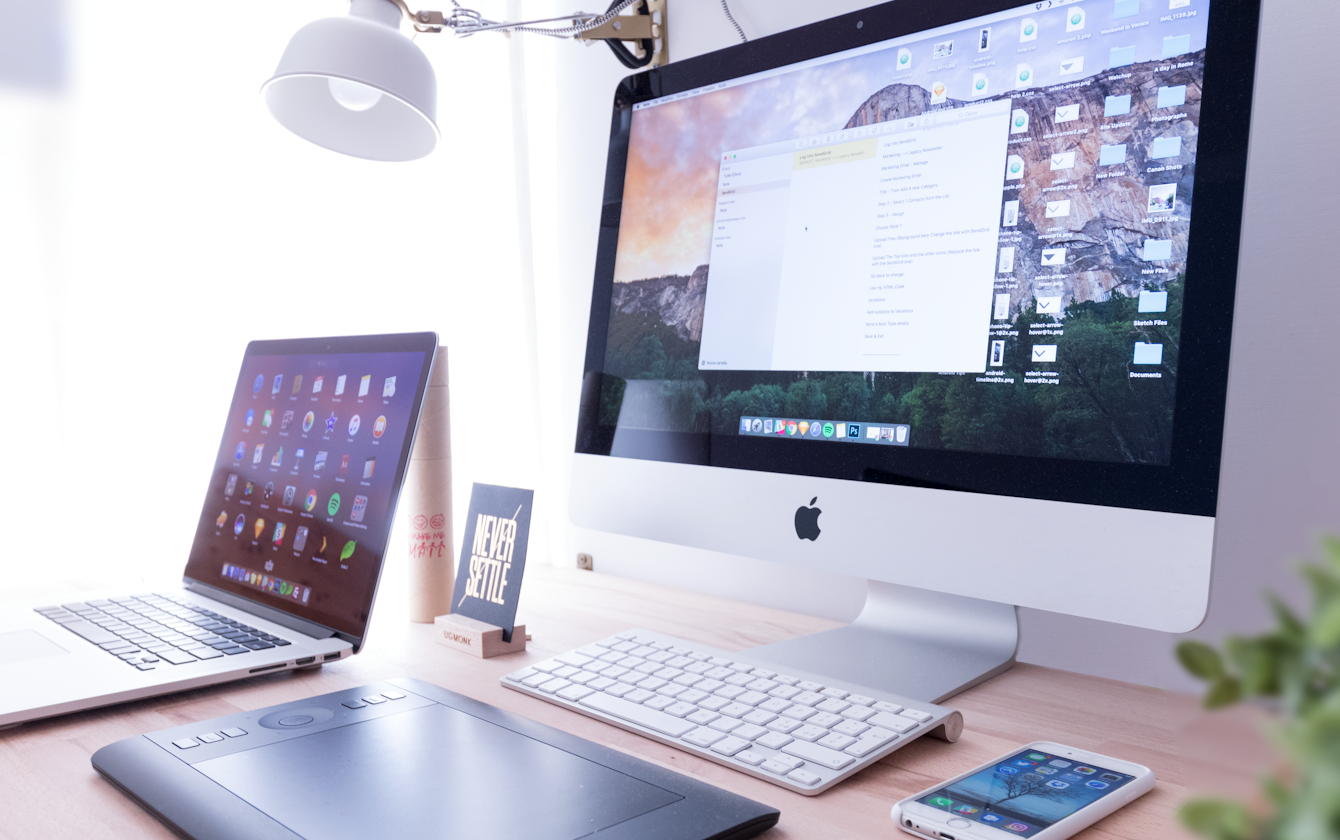
The problem is usually not one big mess. It is a slow buildup of useful things. A laptop stays open beside the main screen. A drawing tablet needs room in front. A notebook stays nearby for rough ideas. Headphones, chargers, reference items, camera gear, or a stack of drafts start settling around the edges because each one feels justified. The desk still works, but it stops feeling clear.
That is what many people really mean when they search for ways to organize your workspace or think, “I need to organize my office.” They are not trying to create an empty minimalist desk. They want a creative setup that still supports design work, editing, sketching, and regular desk tasks without making every session feel cramped.
TidySnap helps at exactly that point. You can upload a real photo of your desk and turn general advice into a visual plan based on your actual screens, tablet, tools, and the zones that keep getting overloaded.
Quick Answer
If you want to organize a creative desk for daily design work, start here:
- choose one true primary work zone instead of letting every tool fight for the center
- decide when the tablet, notebook, or keyboard gets the front edge
- keep reference items and inspiration off the main work surface unless they are active now
- group small creative tools into one support zone instead of spreading them across the desk
- keep cables and adapters on one route so they do not cut through the working area
- leave one open landing area for quick sorting, sketching, or temporary items
- reset the desk back to one default layout at the end of the day
For most creative setups, that helps more than buying another organizer.
What People Usually Mean by a Creative Desk
A creative desk often has to support more than one mode of work:
- screen-based work like design, editing, research, or production
- sketching, note-taking, or rough planning
- device-based tasks like using a tablet, camera accessory, controller, or external drive
- temporary reference material that feels important enough to leave out
That overlap is why creative desks drift so easily.
You are not just storing objects. You are switching between modes. And if every mode stays visible at once, the surface becomes harder to read.
Why Creative Desks Start Feeling Crowded Early
Creative desks often look tidy to other people while still feeling frustrating to use.
That is because the clutter is usually made of legitimate tools:
- laptop and monitor
- tablet or sketch pad
- keyboard and mouse
- headphones
- notebook
- charger and adapter
- external drive
- reference object or sample
None of those items is random. The problem is that too many useful tools stay active at the same time.
That creates three kinds of friction:
- visual noise from too many objects competing for attention
- physical crowding near the front edge where your hands need to work
- decision fatigue because the desk no longer shows what the current task is
Pick One Primary Work Zone
A creative desk feels better when the center clearly belongs to the task you are doing now.
If you are editing or designing on screen, the center usually needs to belong to:
- keyboard or tablet input area
- main display line
- enough hand space to work comfortably
- only one active note or reference item
If you are sketching or mapping ideas, the center usually needs to belong to:
- one notebook or tablet
- one writing or drawing tool
- enough open room for your hands to move freely
- only the reference material tied to that idea session
If you are reviewing assets or files, the center usually needs to belong to:
- one device in use
- one active storage or accessory item
- one temporary sorting space
- no leftover gear from other tasks
| Work mode | What belongs in the center | What should move aside |
|---|---|---|
| design or editing | main input device, screen line, one active note | old sketches, extra cables, backup gear |
| sketching or planning | notebook or tablet, one pen, clear hand space | keyboard, headphones, spare accessories |
| file review or export | one active device, one temporary landing area | dormant tech, unopened mail, loose tools |
That one decision makes the desk feel more intentional almost immediately.
Do Not Let the Front Edge Become Storage
The front edge of a creative desk matters more than people think.
That area needs to stay usable for:
- your wrists and hands
- tablet movement
- quick note-taking
- placing one temporary item without knocking into something else
Once the front edge starts holding chargers, small gadgets, loose pens, sticky notes, or sample items, the desk feels cramped even when the back half still looks clean.
A better rule is simple:
- keep the front edge for active hand movement only
- move support items to one side cluster
- keep backup tools behind or beside the main work line
Give Tools One Support Zone
Creative desks often feel messy because the small items spread outward.
That can include:
- stylus or pens
- adapters
- charging cables
- headphones
- card reader
- external drive
- sticky notes
- small reference objects
The fix is not hiding everything. The fix is giving these items one support zone.
That zone might hold:
- one tray for adapters and drives
- one cup or holder for pens and styluses
- one charging corner
- one place for headphones when they are off
Grouping tools keeps the desk readable and makes cleanup faster.
Keep Reference Material From Becoming Permanent Decor
Creative work often comes with inspiration and reference material.
That might be:
- printed layouts
- packaging samples
- color references
- sticky notes with ideas
- books or magazines
- screenshots open on a second device
The problem is that reference items often stay out after they stop being active.
A better rule is:
- keep only the reference tied to the current task visible
- move passive inspiration to a shelf, wall, folder, or nearby bin
- do not let the desk become an archive of half-finished ideas
If the surface is holding yesterday’s inspiration while you try to do today’s work, the desk is doing too much.
Keep Cables and Devices on One Route
Creative desks can get visually busy very fast because devices multiply cable paths.
A stronger default is:
- send permanent cables behind the screen line
- keep daily charging on one side only
- store backup adapters off the surface
- avoid routing cords through the drawing or writing area
| Item | Better location | Why it helps |
|---|---|---|
| drawing tablet cable | rear edge or one side route | protects hand movement |
| charger | one side corner | keeps the middle clearer |
| backup adapters | tray or drawer | stops emergency gear from living on the desk |
| headphones | single hook or one side resting spot | prevents surface creep |
If every device creates its own path across the desk, the setup will feel busier than it really is.
Better Layouts for Common Creative Desk Setups
Laptop plus monitor plus tablet
Best approach:
- choose which device is truly primary
- keep the tablet in the active hand zone only when in use
- move the laptop so it does not compete with the main screen
- keep one side cluster for power and accessories
If your setup also depends on a laptop and external display, read How to Organize a Laptop and Monitor Desk Setup Without Losing Work Surface.
Small creative desk at home
Best approach:
- keep only one active creative tool on the desk at a time
- reduce decorative clutter near the hand zone
- use vertical or nearby storage for passive materials
- protect one open landing area no matter how small the desk is
If space is the bigger issue, read How to Organize Your Workspace When Your Desk Is Too Small.
Clean digital-first creative setup
Best approach:
- keep tech visible but grouped
- stop accessories from forming separate mini piles
- keep references digital when possible
- reset back to one default working layout every evening
Where TidySnap Helps
This is where many people get stuck. They understand the advice, but when they look at their own desk they still wonder:
- which tool is actually crowding the space?
- where should the tablet live when it is not active?
- what should stay visible every day, and what is just taking up room?
- how do I keep the desk creative without making it visually noisy?
TidySnap helps from a real photo of your workspace. It can help you:
- identify which zone is overloaded
- separate active tools from backup tools
- reduce accessory spread across the surface
- protect the area where your hands actually work
- build a layout you can repeat tomorrow instead of re-deciding everything every time
A 10-Minute Reset for a Creative Desk
| Minute | Action | Goal |
|---|---|---|
| 0-2 | remove cups, packaging, and obvious non-work items | clear fast visual noise |
| 2-4 | return the main input setup to its default position | restore the working center |
| 4-6 | move adapters, drives, and small tools into one support zone | stop accessory spread |
| 6-8 | remove inactive reference items from the desk surface | reduce visual overload |
| 8-10 | route cables back to one edge and reopen one landing area | make the desk usable again |
Common Mistakes
The most common mistakes are:
- keeping every useful tool visible all day because each one feels important
- letting the front edge fill with adapters, notes, and small accessories
- leaving old reference material on the surface after the task changed
- allowing cables to cross the area where you sketch, type, or edit
- using the desk as both a workstation and a storage shelf for backup gear
Final Takeaway
If you want to organize a creative desk for daily design work, the goal is not to make it look empty. The goal is to make the desk readable, flexible, and easier to use across different kinds of work.
That usually means:
- one primary work zone
- one support zone for small tools
- one cable route
- one open landing area
- one default layout you can reset to quickly
And if you want help applying that logic to your actual setup, TidySnap can turn one workspace photo into a visual organization plan you can use right away.
FAQ
What should stay on a creative desk every day?
Usually only the tools you use in nearly every session: the main screen or device, one primary input setup, and one small support cluster for daily tools. Everything else needs a reason to stay visible.
How do I organize a desk with a drawing tablet?
Treat the tablet as an active work tool, not a permanent tabletop decoration. Keep it in the main hand zone when you are using it, and give it a clear resting spot when you are not.
Why does my creative desk feel messy even when it looks tidy?
Because creative clutter is often made of legitimate tools. The issue is usually not dirt or randomness. It is too many active-looking items competing for the same workspace.
How do I stop creative tools from spreading across the desk again?
Use one support zone for small gear, keep only current reference material visible, and end the day by returning the desk to one default working layout.