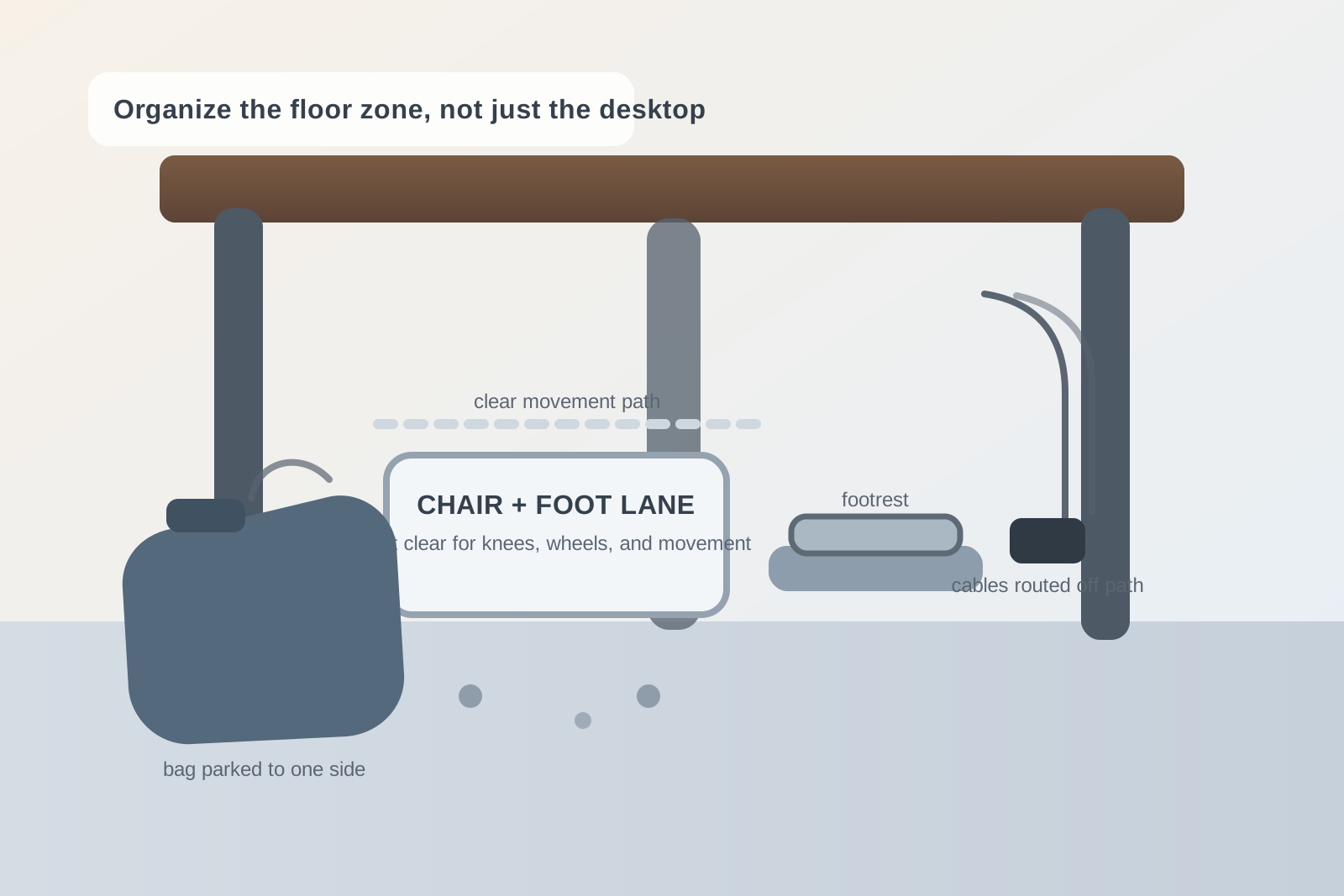
How to Organize Under Your Desk Without Turning It Into Bag, Cable, and Footrest Chaos
A desk can look tidy from above and still feel irritating every time you sit down.
The problem is often the floor zone nobody plans on purpose. Your bag ends up where your chair needs to roll. A charging brick lands near your feet because there was nowhere else for it to go. A footrest helps for one hour, then gets shoved sideways when you stand up or pull the chair back. By the end of the week, the space under the desk is doing three jobs badly: storage, cable management, and leg room.
If you want to organize your workspace in a way that actually feels better to use, the area under the desk deserves its own rules. You do not need a complex setup. You need the chair path clear, the floor tools stable, and the things you park below the desktop to stop competing with your body.
Quick answer
To organize under your desk without creating daily friction:
- keep one clear lane for your chair and feet
- separate floor-support items from items that should be stored elsewhere
- give your bag one parked position instead of letting it drift
- keep charging bricks and loose cable slack off the main foot path
- decide whether a footrest is a permanent tool or an occasional one
- reset the floor zone whenever you end up kicking something twice in one day
That usually works better than buying another cable box while still treating the whole under-desk area like leftover space.
The real problem with under-desk clutter
Under-desk mess feels different from desktop mess.
When clutter builds on top of a desk, you can usually see it and deal with it later. When clutter builds below the desk, you feel it first. Your knees hit something. Your shoe catches a cord. Your chair stops short. Your bag strap wraps around a wheel. The whole workspace starts asking for little physical adjustments that break focus more than people expect.
That is why the goal is not simply making the floor look cleaner. The goal is removing tiny interruptions from the way you sit, roll, stand, and reach.
Start with three under-desk zones
Most desks work better when the area below them is divided into three simple zones:
| Zone | What belongs there | What stays out |
|---|---|---|
| movement lane | chair base, leg room, and the path your feet use naturally | bags, boxes, loose power bricks, and random storage |
| support lane | one footrest, one mat edge, or one intentional floor tool | backup supplies, shopping bags, and paper piles |
| parked-items lane | one bag, one laptop case, or one small item you intentionally keep nearby | anything you need to reach around with your feet during normal work |
This helps because most under-desk clutter is not too many items in absolute terms. It is too many items sharing the same physical path.
Keep the chair path sacred
If your chair cannot move smoothly, the workspace never feels settled.
That means the highest-priority rule is simple: nothing should live where the chair rolls backward, pivots, or slides in. Not your tote bag. Not a backup pair of shoes. Not a stack of unopened supplies. Not a charging brick you swear you will move later.
A good test is this: can you stand up, roll back, and sit down again without adjusting anything with your feet?
If the answer is no, the under-desk setup is still acting like storage instead of support.
Give your bag a parking spot, not a vague area
Bags create a specific kind of floor clutter because they change shape.
A backpack that looks fine at 9 a.m. can slump into the chair path by noon. A laptop bag with a long strap can hook a wheel without warning. A tote can slowly spread across more floor space than it seems to deserve.
Pick one of these setups and stick to it:
- side park if the desk has room on one outer edge and the bag will not block drawers or walking paths
- hook or hanger if the bag is light enough and the desk can support it safely
- rear park if the bag only needs occasional access and can sit behind the chair path instead of inside it
What usually fails is the in-between habit where the bag stays under the center of the desk because it feels close but ends up in the way of everything.
Treat chargers like infrastructure, not floor clutter
Many people think their under-desk problem is the bag. It is often the cables.
A single power brick on the floor can create more irritation than several visible items on the desktop. It shifts when you nudge it, pulls the cable angle into your knees, and turns the foot area into a place you have to navigate instead of use naturally.
A better rule:
- keep charging bricks clipped, lifted, or pushed fully out of the main foot zone
- leave only the cable length you actually need near the user position
- avoid letting one cable cross the same space where your footrest or chair wheels move
- remove cables that belong to devices you are not actively using this week
If the cable path changes every day, the floor zone will always feel temporary.
Decide whether the footrest is active or stored
A footrest helps many setups, but it also creates a constant boundary in the exact place your feet want to improvise.
That is not a reason to get rid of it. It is a reason to decide what role it has.
If you use it every day
Make it part of the support lane and keep it centered where your feet naturally land. Nothing else should compete with that zone.
If you use it only sometimes
Treat it like an occasional tool. Slide it to one side when not in use instead of letting it sit half-active in the middle where it becomes another thing your chair and cables have to work around.
A lot of under-desk frustration comes from tools that are never fully in use and never fully put away.
Watch for fake storage wins
Some under-desk solutions look tidy because they hide things, not because they improve the setup.
That includes:
- stuffing backup supplies behind a table leg
- keeping old device boxes below the desk because they are “out of sight”
- stacking paper on the floor in a file crate you rarely open
- parking multiple bags in the same spot because the area feels unused
Those choices can make the top of the desk look calmer while quietly making the workspace harder to sit in.
If an item does not support today’s work, the space under the desk is usually the wrong place for it.
Make standing up and sitting down part of the organization test
A lot of desk advice focuses on where things should sit when you are already working.
A better test is what happens during transitions.
Your under-desk setup is probably working if you can:
- sit down without moving your bag first
- plug in without dragging a charger across the floor
- use the footrest without twisting around a cable
- stand up without trapping a wheel in a strap
- push the chair back in without hitting hidden clutter
If those movements still feel awkward, the problem is not solved yet even if the floor looks cleaner.
A five-minute reset that actually helps
If this area gets messy fast, try this simple reset at the end of the day:
- pull the chair out and look at the full floor zone
- remove anything that migrated into the movement lane
- return the bag to its real parking spot
- straighten the footrest or move it fully aside
- coil or route the one cable that drifted where your feet go
That short reset usually does more than a bigger weekly cleanup because under-desk clutter grows through drift, not drama.
Where TidySnap fits
Under-desk clutter is easy to ignore because you are not always looking at it straight on. TidySnap helps by giving you a clear photo-based view of how the desk actually works as a whole, including the bag position, foot zone, and cable path that might be creating friction you only notice indirectly.
That is useful when the workspace looks fine on the surface but still feels annoying every day.
Final thought
A better desk setup is not only about what sits on top of the desk.
It is also about whether the space below it stays open enough to move naturally. Clear the chair path first, give bags a real parking spot, keep cables out of the foot lane, and decide whether the footrest is active or stored. When the under-desk area stops competing with your body, the whole workspace feels easier to use.