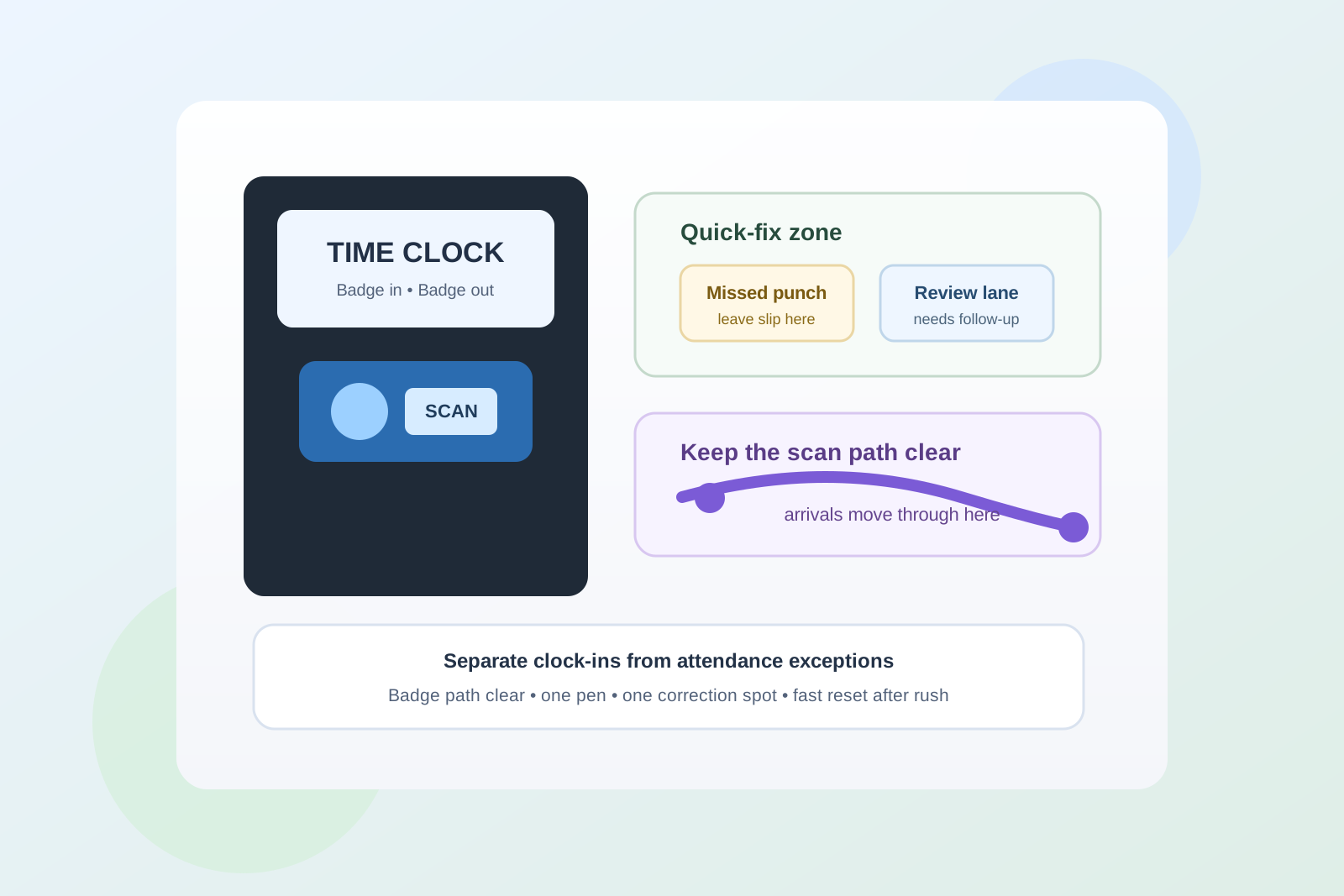
Office Time Clock Station Organization for Badge Scans, Missed Punches, and Shift-Start Traffic
A time clock station usually gets messy before anyone notices it as an organization problem.
One person pauses to badge in. Another realizes the scanner did not catch the swipe. Someone leaves a note about a missed punch because they do not want to forget it before payroll. A pen disappears, a correction form gets tucked behind a sign, and now the wall or counter around the clock is doing three jobs at once: arrival, exception handling, and temporary storage.
If you want to organize an office time clock station, the goal is not making the area look empty. The goal is making clock-in flow readable enough that people can badge in, handle a quick issue, and move on without turning the nearest surface into attendance overflow.
Quick answer
An office time clock station works better when you separate the main clock-in point from the exception items around it. Keep the badge-scan path physically clear, give missed-punch notes and correction slips one small follow-up zone, keep writing tools attached to the station instead of floating nearby, and remove unrelated papers from the same wall or counter. The station should help people move through shift start quickly, not ask them to decode a mini paperwork pile.
Why time clock stations become clutter magnets
A time clock area gathers a specific kind of clutter because every item feels short term.
The scanner is used for a few seconds. A correction note feels temporary. A posted reminder seems important enough to leave up. A manager may tape up one instruction during a busy week and never remove it. Before long, the station is carrying several layers of information:
- people clocking in and out right now
- missed-punch or correction notes
- pens for manual logs or comments
- printed instructions about schedules, grace periods, or outages
- badges or temporary access items someone set down for a minute
- random nearby papers because the area already looked administrative
That mix creates friction fast. The problem is not only that the station looks busy. It is that the busiest moment of the day now depends on a tiny area that is hard to read at a glance.
Organize by action, not by supply type
A time clock station is easier to use when each visible part answers one question.
| Zone | What belongs there | What stays out |
|---|---|---|
| badge-in zone | the active clock, scanner, and the clear standing space needed to use them | pens, stacked forms, spare badges, and unrelated notices |
| quick-fix zone | one small place for missed-punch slips, correction notes, or outage instructions | bulk forms, old exceptions, and general office paperwork |
| support zone | one tethered pen, one clipboard if needed, and one simple posted instruction | extra office supplies, random tape, and backup stationery |
| review lane | unresolved attendance notes waiting for the right person to collect them | items people need during the actual clock-in moment |
This works because a time clock station is not really a supply station. It is a traffic point. People should be able to tell immediately where to stand, what to touch, and where to leave the rare item that needs follow-up.
Protect the badge-scan path first
The most important part of the setup is the path people use without thinking.
If the scanner is blocked by a dangling pen, a taped memo, a leaning clipboard, or a stack of forms on the nearest ledge, the whole station slows down. Then people start stepping aside to fix their clock-in, setting badges down, and creating even more visual noise around the device.
Keep the scan area as plain as possible:
- clear standing room directly in front of the clock
- no papers covering the face or edge of the device
- no loose supplies resting on the same shelf or ledge
- no extra signage that makes the actual action point harder to see
The badge-in zone should feel obvious enough that a new employee or visitor can understand it without needing instructions first.
Give missed punches one defined landing spot
A lot of time clock clutter comes from exceptions pretending to be part of the main flow.
Most people badge in normally. A smaller number need to leave a correction note, ask about a missed punch, or flag a scanner issue. When those exceptions do not have a clear home, they get taped beside the screen, slid under the device, or left on the nearest desk.
That is how a clean attendance tool turns into a tiny paper nest.
A better approach is one visible quick-fix zone only. That can be:
- one slim wall pocket
- one labeled clipboard
- one narrow tray on a nearby shelf
- one clearly marked envelope for correction slips
The rule is simple: if it is not part of clocking in right now, it should not sit in the badge-in path.
Keep instructions short enough to help during rush moments
Time clock stations often accumulate too many signs.
One notice explains rounding rules. Another explains what to do during outages. Another reminds people to report missed punches. Another lists manager contacts. Even if every note is technically useful, the stack of instructions makes the station harder to use when people are actually arriving.
Keep only the instruction that helps in the current moment. Usually that means one short posted guide such as:
- badge in or out
- if the clock fails, use the correction slip here
- place unresolved issues in the review lane
Anything longer should move to a nearby admin board, handbook, or shared drive. The station itself should stay quick to scan.
Stop pens and clipboards from wandering into nearby work areas
Writing tools create more sprawl here than most offices expect.
If the station needs a pen for manual notes, someone will eventually borrow it for another task and leave it at reception, on a break-room counter, or beside a printer. Then the next missed-punch note gets written on whatever scrap paper is available, or not written at all.
Keep only one active writing tool in the station support zone and keep it attached, contained, or obvious. If a clipboard is required, give it one parked position that does not cover the clock or the sign-in path.
This is not about making the station look formal. It is about stopping one tiny support tool from turning the whole area into a scavenger hunt.
Separate live attendance exceptions from payroll processing
A time clock station should not become a miniature payroll desk.
If old correction slips, resolved notes, and follow-up paperwork stay near the clock for days, people start treating the area like long-term attendance storage. That makes new issues harder to spot and invites unrelated paperwork to join the same pile.
Use a simple rule:
- the station holds today’s live exceptions only
- collected corrections leave the station on a repeatable schedule
- processed attendance paperwork moves to payroll or admin storage elsewhere
That boundary matters because clock-in flow and payroll review are connected, but they are not the same job.
Keep temporary badges and access items out of the clock shelf
If the time clock sits near an entry desk, lockers, or security point, people may start parking temporary badges or access cards near it because the location feels related.
That usually causes two problems. First, the station becomes visually busier. Second, people stop trusting whether an item near the clock belongs to attendance, access control, or someone who just set it down for a minute.
If temporary access items need a home, give them a separate station or separate boundary. The time clock should stay focused on one task: moving people through clock-in and clock-out cleanly.
Use a small review lane for unclear issues
Not every attendance note can be solved on the spot.
Sometimes the badge did not work. Sometimes the note needs manager review. Sometimes nobody is sure whether a correction was already entered. If those unclear items stay mixed with the quick-fix lane, the station starts carrying stale uncertainty day after day.
A small review lane helps because it separates:
- quick notes that can be collected fast
- unclear items waiting on a specific person
- old items that should not still be sitting at the station
The lane should stay small on purpose. If it starts growing, the issue is no longer station organization. It is follow-up discipline.
Reset the station after the rush, not only at the end of the day
A time clock station can look fine at noon and still fail during shift start.
That is why the most useful reset often happens right after the arrival rush. Clear the obvious leftovers, collect finished correction notes, remove extra papers, and put the pen back where it belongs. A short reset after the busy moment keeps small clutter from hardening into the station’s normal state.
A simple setup that works in most offices
If you want a practical default, use this layout:
- center: clock or badge scanner with clear standing room
- one side: one short posted instruction
- below or beside: one quick-fix pocket for missed-punch slips
- separate small spot: one review lane for unresolved attendance notes
- support item: one tethered pen or one parked clipboard only if truly needed
That setup works because it respects the real flow. People clock in first. Exceptions happen second. Follow-up happens somewhere controlled instead of spilling across the nearest surface.
Final thought
The best-organized time clock station does not look full of attendance tools. It looks easy to use.
When the badge path is clear, the exception lane is small, and unresolved notes do not linger in the main clock-in area, shift starts feel faster and the surrounding workspace stays cleaner. That is the real win: not a prettier wall, but fewer tiny attendance problems spreading into the rest of the office.