A shared office reference shelf usually gets messy in a quiet way.
Nobody decides to create clutter. People just need one policy binder, one visitor form, one supply guide, one floor plan, or one equipment manual right now. So they pull something out, leave an extra copy beside it, tuck a newer version on top, and slide an unrelated packet into the same open space because it looks close enough. A few weeks later, the shelf still looks useful from across the room, but nobody trusts it up close.
If you want to organize your office without making basic information harder to find, treat the reference shelf like a live access point, not like general paper storage.
Best setup in one glance
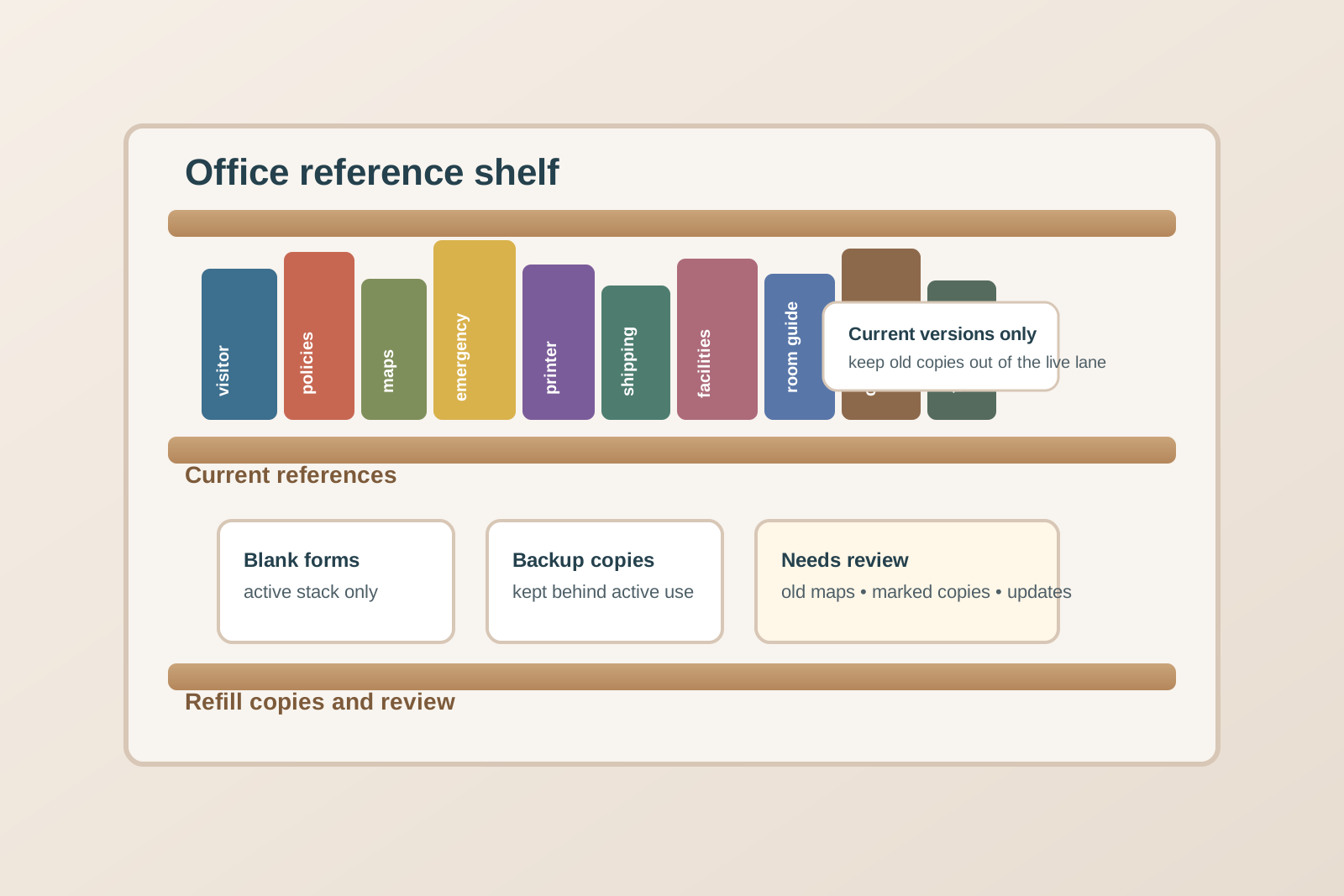
Set up the shelf in three clear sections:
- Current references people reach for often like policy binders, room guides, phone lists, emergency instructions, and equipment quick-start sheets.
- Limited backup copies for forms or packets that need refilling, kept behind or below the active set instead of mixed into it.
- Review or replace items that need updates, removal, or confirmation before they go back.
The goal is simple: someone should be able to walk up, spot the right category fast, and return the item without creating a new paper pile.
Why office reference shelves stop being trustworthy
Most offices do not lose control of a reference shelf because they have too many manuals.
They lose control because the shelf starts serving too many jobs at once. It becomes part library, part inbox, part archive, part spare-supplies zone, and part temporary landing spot for anything that looks official. Once that happens, people stop knowing whether they are looking at the current version, the extra copies, or something that should have been removed last month.
That uncertainty is what creates clutter pressure. When the shelf is not reliable, people start keeping duplicate papers on desks, at reception, near the printer, or inside whatever drawer feels safest.
Organize by information status before subject matter
It is tempting to group everything by topic alone: HR together, facilities together, visitor information together, office maps together.
That only works if every item on the shelf is equally current, equally active, and equally likely to be touched. Usually it is not.
Start with status first:
- Use now for current references people may grab today
- Refill copies for extra blank forms or backup handouts
- Needs review for outdated, damaged, half-empty, or questionable materials
Then organize inside the active area by subject or workflow. That keeps the shelf readable even when the subjects are mixed.
Keep forms separate from read-only references
Blank forms create different clutter than manuals and policy binders.
A manual is usually borrowed and returned. A blank form is usually taken, half-used, or depleted. When both live in the same visual lane, the shelf starts looking messy even when nothing is technically wrong.
Give forms their own narrow zone with only the live quantity you actually want people to grab. Keep the backup stack elsewhere on the same shelf or one shelf lower. That way the active area stays tidy, and nobody has to dig past a giant pile just to find one sign-in sheet or visitor log page.
Make policy binders and procedure guides easy to identify from a distance
Reference shelves get slowed down when every binder spine looks almost the same.
You do not need elaborate labels. You do need quick visual cues. Use short spine labels that answer the question a person is really asking:
- visitor check-in
- emergency contacts
- room setup guide
- printer quick fixes
- facilities requests
- shipping instructions
If the office relies on large policy binders, keep only the versions that people genuinely consult in the shared area. Archive or relocate rarely used full binders so the shelf does not turn into a wall of almost-never-opened documents.
Protect one space for current versions only
A reference shelf becomes unreliable when outdated copies linger because nobody wants to throw away something that looks important.
Create one thin review lane for anything that needs confirmation before it goes back. That includes old room maps, superseded forms, marked-up quick guides, mystery printouts, and damaged packets with missing pages.
What matters is that these items do not go back into the current section while someone decides. The active shelf should communicate confidence. If people cannot tell what is current, they stop using the shelf correctly.
Stop nearby desks and counters from becoming unofficial overflow
When the shelf is hard to use, the overflow shows up somewhere else first.
Usually it lands on the reception counter, the nearest filing cabinet, the printer stand, or one person’s desk who seems to know where things belong. That is a sign that the reference shelf is asking for too much interpretation.
Fix that by reducing the number of categories in the active zone. A smaller, clearer shelf works better than a fuller one. If an item is not needed for quick shared access, it should not live in prime shelf space.
Set simple limits for extra copies
Backup copies are useful until they erase the difference between active information and stored paper.
Decide in advance how many extras belong near the active reference set. For example:
- one open pack of visitor forms
- one backup stack of room guides
- one spare copy of each emergency contact sheet waiting for refresh
Anything beyond that should move to cabinet storage, not stay on the visible shelf. A reference shelf is for fast access, not maximum paper capacity.
Use TidySnap to keep the shelf from drifting back into clutter
Once the shelf is organized, the next challenge is noticing when it starts slipping.
TidySnap helps by giving you a quick visual record of the shelf setup, so it is easier to compare what the zone is supposed to hold against what has quietly crept in. That is especially useful for shared office areas where nobody feels fully responsible, but everyone depends on the space staying readable.
You do not need a perfect shelf. You need one that keeps current references visible, backup copies contained, and outdated papers from leaking back into daily use.
Final thought
A good office reference shelf should answer basic questions quickly.
Where is the current form? Which binder is the right one? Is this copy still valid? Can I take one without wrecking the whole stack?
If the shelf cannot answer those questions at a glance, people will rebuild their own backup systems on desks and counters nearby. Organize the shelf around current use, limited backups, and a clear review lane, and the whole workspace gets easier to trust.