Office Printer Supply Cabinet Organization for Paper, Toner, and Specialty Media
Printer clutter does not always happen at the printer.
A lot of it starts in the cabinet beside it. One shelf has copier paper, label sheets, and old tab stock leaning into each other. Extra toner is somewhere in the back, but nobody wants to pull everything out to check. Open reams are stacked on top of sealed ones. Someone tucked shipping labels next to envelopes because they were both paper. Then a slightly unusual print job comes up, and the whole office loses five minutes hunting for the right thing.
A better printer supply cabinet is not about storing more. It is about making routine refill items obvious and keeping specialty media from turning every shelf into a guessing game.
Quick answer
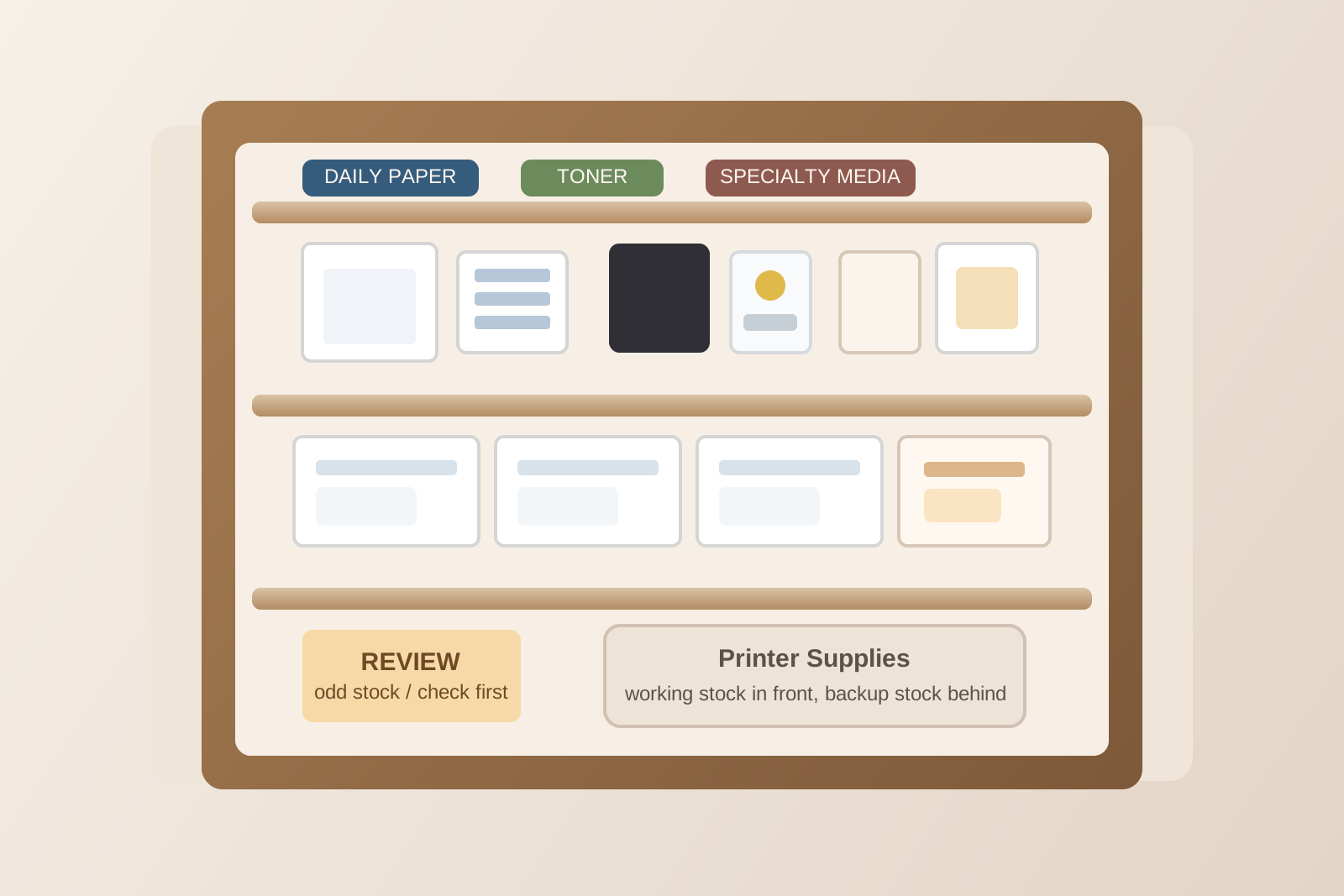
To organize an office printer supply cabinet, separate daily paper and toner from specialty media, keep one clearly labeled active layer for the items people reach for most, store open stock away from sealed backup stock, and give problem supplies their own review spot instead of letting them drift through the cabinet. The goal is to make normal refills fast while keeping less-common print materials easy to identify when they are actually needed.
Start with the print jobs that happen every week
Most offices do not need every paper product to be equally easy to reach.
They need the common jobs to stay friction-free. That usually means plain printer paper, the correct toner, envelopes, and maybe one or two frequently used specialty items such as label sheets or colored paper. Those should form the front layer of the cabinet because they support the work that repeats all the time.
If rarely used stock sits in front of the weekly basics, the cabinet feels disorganized even when it looks neat. People keep moving things around to get to one ream of paper, and the system slowly breaks.
Separate sealed backup stock from open working stock
One of the fastest ways to make a printer cabinet harder to use is mixing opened packs with untouched inventory.
When half-used reams, sealed cartons, and odd leftover sheets all sit together, nobody can tell what is ready to grab. That is when people start opening another fresh pack even though usable stock already exists.
A cleaner setup is to split the cabinet into two layers:
- Working stock: the currently open paper, labels, or envelopes people can use right away
- Backup stock: sealed replacements that stay closed until working stock runs low
This keeps the active section readable and makes reorder decisions easier. You are not counting every sheet. You are checking whether the backup layer still looks healthy.
Organize specialty media by decision, not just by material
Specialty media creates most of the cabinet confusion because it looks similar while behaving very differently.
Label sheets, cardstock, glossy paper, tab dividers, window envelopes, and preprinted forms should not live together just because they are all paper products. The better question is what decision a person is trying to make when they open the cabinet.
Useful groups often look like this:
- Common specialty items: label sheets or envelopes used every week
- Occasional job stock: cardstock, colored paper, tab stock, or presentation media
- Printer-specific items: media that only works for one machine or tray setup
- Use-with-caution items: partly used, older, or compatibility-question supplies
That structure helps someone choose correctly without reading every package front to back.
Keep toner and maintenance items together but separate from paper
Paper tends to spread. Toner tends to disappear.
When toner cartridges, waste containers, cleaning sheets, or maintenance notes get tucked between paper stacks, nobody can tell what is available until the printer demands it. That creates rushed searches at exactly the wrong time.
Give toner its own defined zone in the cabinet. Keep the current printer model information with it if your office has more than one machine or uses similar-looking cartridges. If there are accessories that only matter during maintenance, keep them nearby but not mixed into the main paper shelves.
The point is not to build a technical storage system. It is to make the “printer needs attention” category visible in one glance.
Do not let the top shelf become the graveyard for weird leftovers
Most printer cabinets develop one shelf where uncertain items go to die.
A few damaged label sheets. One half-pack of heavy paper. A toner box from an older model. Random instruction sheets. Samples nobody trusts enough to throw away but nobody wants to use first.
That shelf quietly trains people to stop trusting the entire cabinet.
Instead, create one small review section for questionable items. Keep it physically separate from good stock. If something is still usable but needs a decision, it belongs there until someone confirms whether it should stay, move, or leave.
That keeps doubtful supplies from contaminating the active system.
Store print supplies close to the printer workflow, not close to any empty shelf
A cabinet works better when its layout follows the actual refill sequence.
Paper that goes in constantly should be easy to lift out without disturbing the rest. Toner should not be buried behind specialty stock. The few items that support awkward print jobs should be reachable without emptying half the cabinet first.
Think in terms of motion:
- What gets grabbed during a normal paper refill?
- What gets checked when print quality drops?
- What gets pulled out for a specific nonstandard job?
Arrange the cabinet to support those actions in that order. That is more useful than alphabetizing supplies or grouping them by packaging size.
Put reorder visibility where people already look
Reorder systems fail when they depend on memory.
If the person checking stock has to dig to the back of a shelf to realize the office is down to one toner cartridge, the warning came too late. It is better to build reorder visibility into the front of the cabinet.
That can be as simple as:
- keeping backup stock in fixed quantities
- leaving one obvious space when a replacement needs to be ordered
- attaching a short reorder note area inside the cabinet door
- marking one minimum level for the most critical supplies
The goal is not inventory perfection. It is to make shortage signals hard to miss during an ordinary refill.
Keep the cabinet from absorbing unrelated office supplies
Printer cabinets often become magnet storage.
Tape goes in because it is nearby. Scissors stay there because people use them when opening paper. Spare pens show up. Then mailing supplies, batteries, and random desk leftovers join the mix because the cabinet still had space.
That expansion creates clutter fast because the cabinet stops serving one clear purpose.
If an item does not directly support printing, refilling, or handling printer-specific media, it probably belongs somewhere else. A narrower purpose makes the whole cabinet easier to maintain.
Where TidySnap helps
If you are trying to keep a printer supply cabinet readable over time, TidySnap can help you notice where the clutter pattern actually starts. A quick photo check can make it easier to spot mixed categories, overloaded active shelves, and backup stock that is technically present but visually invisible.
That makes it simpler to reset the cabinet around real usage instead of reorganizing it by guesswork.
FAQ
How many paper types should stay in the front of the cabinet?
Usually only the ones used every week. Plain paper should be easiest to reach, and one or two recurring specialty items can stay nearby if they are part of normal office work.
Should open paper stay with sealed paper?
No. Open stock is easier to use when it has its own working area. Sealed stock should stay separate so people can see backup levels without sorting through partial packs.
What should I do with leftover media nobody trusts?
Do not leave it mixed into active stock. Put it in a small review section until someone decides whether it is usable, machine-specific, or ready to discard.
Can one cabinet hold both print supplies and general office supplies?
It can, but it usually becomes harder to maintain. If possible, keep the printer cabinet focused on paper, toner, media, and printer support items only.