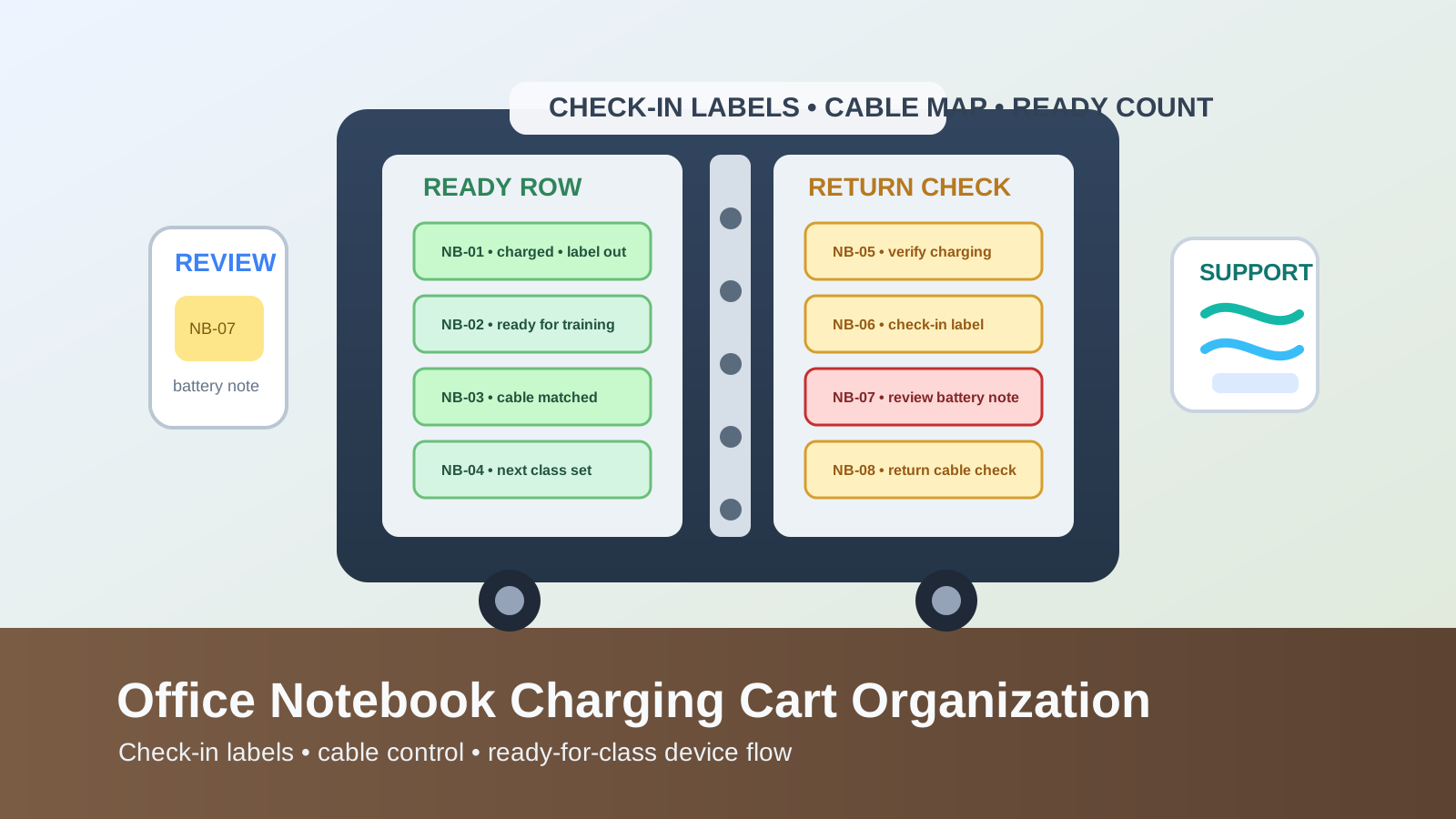
Office Notebook Charging Cart Organization for Check-In Labels, Cables, and Ready-for-Class Devices
A notebook charging cart usually looks organized right up until the next group needs devices fast.
The doors close. The cords are technically inside. Most of the laptops are back where they belong, more or less. But one notebook came back without its label facing out. Another is plugged in loosely and not really charging. A third has a sticky note about a bad battery. Two devices are ready for the next training session, three are still syncing, and one charger has been borrowed for a desk across the room. The cart still looks full, yet nobody feels sure it is actually ready.
If you want to organize an office notebook charging cart, the goal is not only fitting every device into one cabinet on wheels. The goal is making returns, charging checks, label visibility, and next-use readiness easy enough that the cart stops creating last-minute desk clutter around it.
Quick answer
An office notebook charging cart works better when you:
- separate returned notebooks from ready-for-use notebooks instead of treating every slot as equally available
- keep each charging bay tied to one visible label and one stable cable path
- give problem devices a short review lane instead of hiding them back in the main cart
- keep spare chargers and adapters out of the live notebook rows
- reset the cart for the next training block, class, or shared-device handoff before people start grabbing devices again
That setup works because a notebook cart is not just storage. It is a readiness system.
Why notebook charging carts become unreliable so quickly
A shared laptop shelf stays in one place.
A notebook charging cart has to handle movement, returns, charging, and deployment all at once. That creates a different kind of mess.
The cart may be dealing with:
- notebooks that just came back from a meeting room or training space
- devices that are fully charged and ready for the next group
- units that are plugged in but not actually charging properly
- faded asset labels or bay numbers that make returns slower
- missing chargers or swapped cables
- devices with battery, login, or damage notes
- spare adapters that someone tucked into the nearest open slot
When those states all live in the same rows, the cart stops communicating clearly. People hedge by leaving one notebook on a desk until they can test it, parking chargers on a side counter, or keeping a “safe” backup device outside the cart. That is how cart clutter spreads into room clutter.
Organize by return status before slot count
Most notebook carts look full long before they are truly ready.
That is because slot count tells you how many laptops fit, not how many laptops can leave right now. A better system separates notebook state first:
| Zone | What belongs there | What should stay out |
|---|---|---|
| ready row | fully charged notebooks cleared for the next user or class | low-battery returns, damaged units, loose adapters |
| return row | devices just checked back in and not yet confirmed | ready-to-go notebooks |
| review lane | laptops with battery, login, damage, or missing-part issues | ordinary healthy returns |
| support zone | only the approved spare cable or adapter types the cart actually needs | random tech leftovers and retired chargers |
This matters because the real question is not Is there a laptop in the slot?
It is Can someone trust this one for the next session without extra checking?
Make labels readable before you make cables prettier
A lot of notebook carts get reorganized around cable neatness first.
Cable control matters, but unclear labels usually cause the bigger workflow failure.
If bay numbers, device names, or check-in tags are hard to read, people return notebooks to the nearest open space instead of the correct space. Then:
- the wrong charger ends up with the wrong device
- one bay looks empty even though its notebook is hiding elsewhere
- issue notes stay with the wrong machine
- the next user has to open several slots before finding the correct unit
Start with labels that are readable when the cart door opens. The cart should make it obvious which device belongs in which bay and which units are actually ready.
Keep the return step different from the ready step
This is where most charging carts lose trust.
A returned notebook should not go straight back into the same visual category as a ready notebook. Even if it looks fine, someone still needs to answer a few quick questions:
- Is it really charging?
- Is the correct cable attached?
- Is the label still readable?
- Did it come back with a note about battery life, updates, or damage?
- Is it ready for the next handoff, or only physically back in the cart?
That is why a short return row matters.
Returned devices can pause there briefly, get confirmed, then move into the ready row. Without that step, the cart starts lying about what is available.
Stop spare chargers from living in notebook bays
One extra charger in the wrong place does more damage than it seems.
When a spare brick, adapter, or power cord gets tucked beside a notebook, that bay starts doing two jobs at once. Then a second spare follows. Eventually a slot meant for one ready device becomes a holding area for “parts we still need nearby.”
Keep live notebook bays for notebooks only.
If the cart truly needs support gear, keep it in one small support zone for:
- approved spare charging cables
- one backup adapter type if your fleet requires it
- a short cable map or cart note
- nothing that belongs to unrelated desk setups
That keeps missing-parts problems visible instead of burying them inside the same rows that are supposed to supply ready devices.
Use the cart doors and top surface carefully
Notebook carts often fail outside the bays as much as inside them.
The top of the cart becomes a temporary landing zone for:
- devices that are about to be returned
- handwritten issue notes
- checked-out sign sheets
- extra chargers removed “just for now”
- one notebook someone wants to keep aside for a manager or trainer
Once the top surface becomes active storage, the whole cart starts attracting overflow. The same goes for cart doors with pockets or hanging notes that nobody clears.
A stronger rule is simple: the top of the cart is for active handoff moments only, not for all-day storage. If something stays there after the return or pickup step, it needs a real home elsewhere.
Build the cart around the next deployment scenario
A notebook charging cart is usually supporting a repeat use case, not generic storage.
That might be:
- an internal training room
- a conference-room loaner pool
- onboarding sessions for new hires
- rotating shared desks in a hybrid office
- classroom-style workshop blocks inside a company space
The cart should be organized around that next deployment.
If the next use is a training session, the important question is whether the full set is charged, labeled, and easy to distribute in order. If the next use is ad hoc office loaners, the important question is whether each device can be checked out and returned without confusing the rest of the cart.
Organizing around the next deployment is what makes this topic different from a fixed shared-device shelf. A cart needs to stay stable while being opened, moved, and used in bursts.
Give problem devices a visible but narrow review lane
A cart usually feels chaotic because exceptions are hidden in normal rows.
That includes devices with:
- weak battery performance
- broken hinges or cracked cases
- missing asset tags
- login issues
- update prompts that still need attention
- chargers that connect loosely
If these notebooks go back into the main grid, the next user discovers the problem too late. Keep one visible review lane only, with a clear rule that those devices are not part of the ready count.
That single distinction protects the rest of the cart from one bad return starting a chain of guesswork.
A simple layout that works in most offices
If you need a fast default setup, try this:
- upper or easiest-to-grab row: ready notebooks only
- second row or one side section: returned notebooks waiting for quick confirmation
- small side pocket or tagged slot: review devices with an issue note
- small separate support area: approved spare charger or adapter types only
- outside the live rows: bulk backup hardware, retired cables, and unrelated tech
That layout works because it answers readiness first and storage second.
A short reset before the next class or training block
The cart usually stays clean through short resets, not through occasional deep reorganizing.
Before the next session:
- confirm returned notebooks are in the correct labeled bays
- verify charging lights or battery status on units that just came back
- move healthy devices into the ready row
- move problem devices into the review lane with a short note
- remove spare chargers, papers, and side items from the top of the cart
- check that labels face outward so the next handoff is fast
That reset takes a few minutes, but it prevents the familiar moment when a “full” cart still cannot support the next room.
Where TidySnap helps
Notebook charging carts often look basically fine until you see the real pattern in a photo: labels facing different directions, one charger draped across the wrong bay, ready devices mixed with uncertain returns, and the top of the cart acting like a side counter. TidySnap can help you spot whether the cart needs a clearer ready row, a tighter return lane, or a better separation between support gear and live devices.
Final thought
A good office notebook charging cart should do more than hold laptops behind a locked door.
It should make readiness visible. When labels are easy to read, returns pause before becoming “ready,” support gear stays out of the live rows, and problem devices have their own review lane, the cart stops creating last-minute tech clutter around the room. It becomes a reliable handoff point for the next class, meeting, or shared-work block.