Office Incoming Forms Tray Organization for Signatures, Scan-Backs, and Pickups
Paper clutter in an office often starts one step before anyone sits down to deal with it.
A form comes in for a signature. A packet needs to be scanned back after one page is signed. Someone drops off a pickup sheet that should go out again this afternoon. Another document is technically finished but still sitting in the same tray because nobody knows whether it was already returned. The mess is not always dramatic. It is usually a quiet paperwork queue with no clear status.
If you want to organize your office without letting forms spread across desks, counters, and printer stands, the fix is not building a larger paper pile in a nicer tray. The fix is giving incoming paperwork a short, readable flow so people can tell what needs action now, what is blocked, and what is already on its way out.
Quick answer
An office incoming forms tray usually works better when you:
- separate sign-now paperwork from forms that still need review or extra information
- keep scan-back items distinct from simple signatures or pickups
- give completed paperwork one clear exit spot instead of leaving it in the same tray
- limit the tray to active short-term paper, not archived reference packets
- review unclear leftovers before they blend into the live queue
That usually does more for the workspace than adding another stackable tray to a counter that still mixes every paper state together.
Why forms trays become clutter faster than expected
An incoming forms tray looks simple because the items are all paper.
The problem is that the papers are doing different jobs. One needs a fast signature. One is waiting for backup documents. One should be scanned and emailed back. One is ready for a named pickup. One was already handled, but nobody moved it out of the active zone. Once those states mix, the tray stops acting like intake and starts acting like a holding pen.
That is when the overflow begins. People pull one sheet out, set two others on the desk “for now,” leave a completed packet by the scanner, and tuck a questionable form under the top stack because they do not want to make the call. The tray may still look contained, but the workflow has already leaked into the room.
Organize by next action, not by form type alone
A lot of offices sort paperwork by department or document category first.
That can help later, but it does not solve everyday paper friction. For the visible tray area, next action matters more:
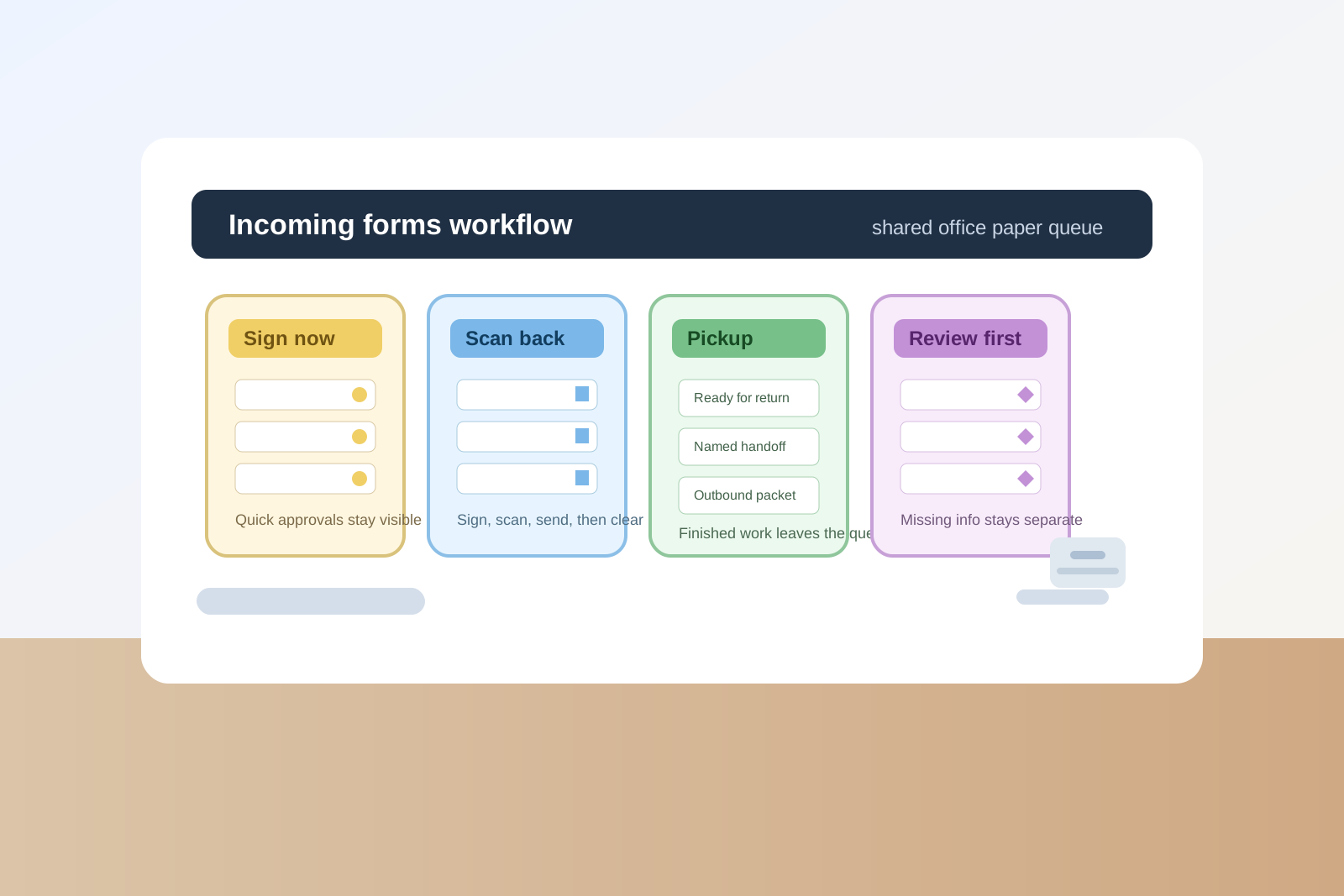
| Zone | What belongs there | What stays out |
|---|---|---|
| sign now | forms that only need a signature, initials, or one quick approval | packets missing information, finished paperwork, and reference copies |
| scan back | documents that need signing plus scanning, emailing, or digital return | print-only handouts and simple pickups |
| pickup or return | completed packets waiting for a named person, runner, or outbound route | unsigned forms and mystery paperwork |
| review first | items with questions, missing pages, unclear ownership, or outdated versions | straightforward work that could already be moving |
This makes the tray readable at a glance. A person should not need to shuffle every sheet just to figure out what the pile means.
Keep the sign-now lane short
The easiest forms to finish should be the easiest forms to see.
If quick signatures disappear under thicker packets, small admin tasks start taking longer than they should. They also create fake backlog because people assume the tray is more complicated than it really is.
A better rule is to keep the sign-now lane limited to paperwork that can usually be finished in one touch:
- one signature
- one initial set
- one fast approval
- one simple routing note
If the document needs explanation, attachments, or a second decision, it does not belong in the fast lane anymore.
Give scan-back paperwork its own status
Scan-back items create a different kind of office clutter from basic signatures.
A signature-only form usually leaves the workspace right away. A scan-back packet often lingers because it has one extra step. It gets signed, then left near the scanner. Or it gets partly scanned, then returned to the same tray where it looks unfinished again.
That is why scan-back paperwork needs a distinct place. The goal is to separate:
- ready to sign and scan
- signed and waiting to scan
- scanned and ready to send or file
You do not need three giant trays for that. Even one clearly labeled scan-back lane plus one finished outbox is enough to stop that paperwork from circling the room.
Separate pickup-ready paperwork from active decision work
Pickup packets, handoff envelopes, and signed forms waiting for a named person should not sit inside the same visible pile as new incoming requests.
Those papers are not asking for the same kind of attention. One needs work. The other needs movement.
If they share the same tray, people either miss completed items or keep rechecking paperwork that is already done. A small pickup or return lane fixes that fast because it turns completed paperwork into an exit queue instead of leftover clutter.
Do not let the tray become reference storage
Many office paper areas get crowded because people keep useful-looking extras close by.
That often includes:
- old versions of forms just in case
- blank backup packets stacked with live paperwork
- policy printouts that explain how to fill something out
- envelopes, labels, and loose clips tucked between document stacks
Those items may be related, but they are not incoming forms. If they stay in the same tray, the active queue becomes thicker, slower, and harder to trust.
Keep support materials nearby if needed, but not inside the live paperwork flow.
Use one review lane for unclear items
Unclear paperwork causes more clutter than straightforward paperwork because nobody wants to throw it away or move it to the wrong place.
That includes:
- forms with missing pages
- packets with no owner name
- outdated versions someone might still ask about
- signed papers that seem done but have no clear next destination
- duplicate copies nobody wants to claim
Without a review lane, those items drift back into active piles and make the tray feel perpetually stuck. A small review-first section lets the main workflow stay clean while the questionable items wait for a real decision.
Protect nearby desks from becoming the backup tray
If the office incoming forms tray is doing its job, desks should not be absorbing the overflow.
When papers keep spreading onto a receptionist’s corner, a manager’s keyboard space, or the printer stand, it usually means one of three things:
- the tray is mixing too many statuses together
- finished paperwork has no obvious exit point
- unclear items are staying in the live queue too long
The goal is not only making the tray look better. The goal is making sure paperwork does not need a second unofficial tray somewhere else.
A fast reset for a crowded forms tray
If the tray is already overloaded, reset it in this order:
- pull out anything already completed and move it to pickup, return, send, or file
- separate quick signatures from scan-back packets
- move missing-information or questionable forms into review first
- remove blank extras, outdated versions, and reference sheets from the live tray
- leave visible breathing room so new paperwork has a place to land without covering everything else
That usually works faster than relabeling every stack while the tray is still trying to hold finished, unfinished, and uncertain paperwork together.
Where TidySnap helps
TidySnap helps when a paper area looks manageable until you notice how many different statuses are hiding in one tray.
A quick photo can make it easier to spot whether the live queue is really active paperwork, a finished stack nobody moved, or a review pile that quietly turned into desk-side overflow. That helps shared office spaces stay readable without needing a perfect filing system.
Final thought
A good office incoming forms tray should answer one question quickly: what happens next to this paper?
If every sheet looks equally urgent, equally finished, or equally stuck, people will build side piles on desks and counters to compensate. Organize the tray around next action, give completed paperwork a clear exit, and the whole workspace gets easier to manage.