Office Binding Machine Station Organization for Combs, Cover Sheets, and Finished Packets
A binding machine station usually looks messy because the job seems finished before it actually is.
The pages are printed. The cover sheet is ready. The plastic comb is sitting there. But one packet still needs a test punch, another is missing the back cover, and a finished set has nowhere safe to land while the next stack is being assembled. That is how one small binding machine turns into a spread of loose covers, punched scraps, and report packets that all look almost done.
If you want to organize an office binding machine station, the goal is not only storing combs neatly. The goal is making it obvious what is ready to punch, what is ready to bind, what is complete, and what should leave the station before the next packet starts.
Quick answer
An office binding machine station works better when you separate packet prep from the live punch area, keep combs and cover materials easy to grab by size, leave one protected landing spot for finished sets, and give test punches and failed covers an immediate exit. The station should support a short sequence: stack, punch, bind, check, and clear.
Why binding stations get cluttered so quickly
Binding work creates several small states that are easy to mix together.
You may have:
- pages that are printed but not collated yet
- one sample set being checked for alignment
- clear covers and backing boards in two or three sizes
- open comb packs with only a few pieces left
- finished packets waiting for pickup or delivery
- test punches, misfeeds, and rejected covers still sitting near the machine
None of those pieces looks large on its own. Together, they create a station that stays visually busy even when the actual job is simple.
That is why binding clutter feels different from general paper clutter. The problem is not paper volume alone. The problem is too many almost-finished packet stages sharing one narrow surface.
Organize the station by sequence, not by supply category alone
A lot of offices store binding supplies by item type first. Combs go in one drawer, covers in another cabinet, backing boards on a shelf, and the punch machine stays wherever there is room.
That can work for storage, but it often makes the active station harder to use.
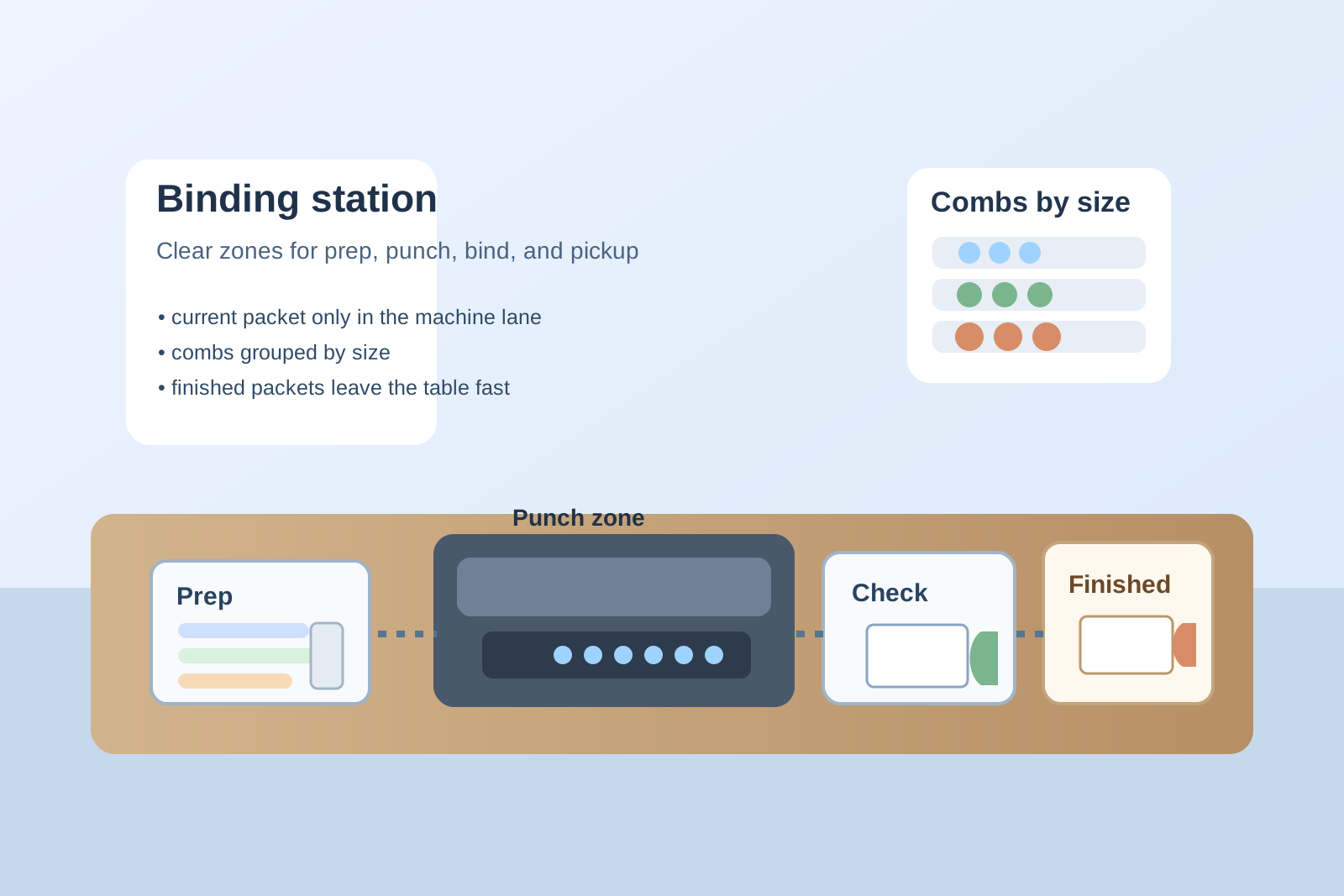
A better setup follows the real sequence:
| Zone | What belongs there | What should stay out |
|---|---|---|
| prep zone | collated pages, the right cover set, the comb size for the current job | backup stock, finished packets, old sample sets |
| punch zone | binding machine, one live stack, one alignment check sheet | mixed packet piles, extra tools, unrelated office supplies |
| bind-and-check zone | punched pages, comb insertion, one quick page-flip check | scrap strips, new unpunched stacks |
| finished zone | completed packets ready to leave | active assembly parts |
| backup zone | unopened comb packs, extra covers, less-used sizes | today’s half-built jobs |
This keeps the station readable. People can see where a packet starts, where the punch happens, where the final assembly happens, and where completed sets should go next.
Keep only one live packet in the punch area
Most binding-station clutter starts when several packet jobs overlap.
One report stack is already punched. Another set is still being collated. A third packet only needs the cover and comb. If all three sit around the binding machine at once, nobody can tell what is ready for the next step.
Keep only one live packet in the punch area.
Everything else should wait in a prep queue or a finished queue. That one rule prevents the most common binding-machine mess: punched pages, unpunched pages, and completed packets blending into one hard-to-trust pile.
Separate cover materials from backup stock
Binding stations often waste time because cover materials look simple until they start mixing.
Clear covers, frosted covers, colored backs, heavier report backs, and odd leftover sizes all tend to gather in one drawer or lean against the wall near the machine. Then every packet job starts with shuffling covers around just to find one matching pair.
A better rule is:
- keep the most-used cover size easiest to reach
- separate front covers from backing boards if they tend to stick together in mixed piles
- store only the working quantity near the machine
- move odd leftovers and damaged covers out before they become the default pile
This reduces hesitation and keeps the prep zone from turning into a plastic-and-cardboard search area.
Give combs one trusted home by size
Plastic combs create clutter because they are light, awkward, and easy to scatter.
Once one pack is opened, loose combs start resting on top of the machine, beside the hole punch, or across the nearest shelf. That makes the station feel more chaotic than it is.
Keep combs grouped by size with the most-used size in the easiest spot. If your office uses only one or two sizes most of the time, those should live closest to the machine. Rare sizes should stay one layer away.
The point is not perfect inventory control. It is stopping the binding machine from becoming the storage tray for loose combs people meant to put back later.
Protect one finished-packet landing area
A finished packet needs a safe landing spot for a few minutes.
Without one, completed reports end up back in the prep zone, on top of unpunched pages, or balanced on the cutter or copier because the machine table is already crowded. Then finished work starts looking unfinished again.
Leave one short finished-packet lane beside the station or on a nearby shelf. It should hold only completed sets that are ready for pickup, delivery, or the next handoff. That small separation makes the whole station easier to trust.
Treat test punches and bad sets as live waste, not later decisions
Binding stations quietly collect little leftovers:
- one test punch sheet
- a cover with the holes too close to the edge
- a mis-collated packet that has to be rebuilt
- trimmed strips or outdated title pages
- empty comb packaging
Those leftovers make the station look permanently active.
Give them an immediate exit. If test pieces and bad covers have no obvious discard or review spot, they stay near the machine and make every new binding job feel more complicated than it is.
Keep the station from becoming a general finishing counter
A binding machine area often attracts unrelated work because it already feels like a document-finishing zone.
Staplers, divider tabs, loose labels, tape, and random handouts start drifting there because someone thinks they may be needed later. Then the station stops serving the binding workflow and starts acting like a parking spot for unfinished office packets.
If an item does not help with collating, punching, binding, checking, or handing off the finished set, it should not stay at the binding machine.
That rule keeps the station focused enough that the next person can use it without clearing a project first.
A simple setup that works in most offices
If you want a practical default layout, try this:
- one side: collated pages, covers, and the comb for the current packet
- center: binding machine with one live stack only
- next lane: quick bind-and-flip check area
- finished lane: completed packets ready to leave
- small support spot: only the most-used comb size, one alignment sample, and one pen for packet notes
- immediate exit point: test punches, failed covers, and packaging
That gives the station a clear flow without turning it into a permanent report-assembly table.
Where TidySnap helps
Binding-machine clutter is easy to underestimate because it often looks like productive work instead of mess. One photo can show the real problem fast: loose combs sitting where live packets should go, covers mixed across the machine table, and finished reports landing back in the prep area. TidySnap can help you see which parts of the station are truly active and which leftovers are making the whole copy-room workflow feel heavier than it needs to.
Final thought
A good office binding machine station does not only store supplies better. It makes report and training packets easier to finish.
When prep materials, the live punch zone, finished packets, and waste each have a clear lane, the station stops feeling like a pile of almost-complete documents. It becomes a reliable finishing point that supports the rest of the office instead of slowing it down.