How to Organize an Office Phone Charging Locker for Shared Desks, Shift Phones, and Personal Devices
A phone-charging area gets messy fast when nobody can tell whether a device is parked, charging, assigned, forgotten, or about to leave with the wrong person.
One employee plugs a personal phone into the nearest open cable before heading to a shared desk. A shift phone comes back with 18 percent battery and no label on the charger. Someone leaves an old power brick in the locker bay because it still works for something. Another person balances their phone on a shelf outside the locker because every inside slot is half-occupied by adapters and tangled cords. By lunch, the area is not only full of devices. It is full of status confusion.
If you want to organize an office phone charging locker, the goal is not simply hiding phones behind doors. The goal is making secure charging, quick pickup, shared-phone handoff, and personal-device parking feel obvious enough that phones stop leaking onto desks, counters, and entry surfaces.
Quick answer
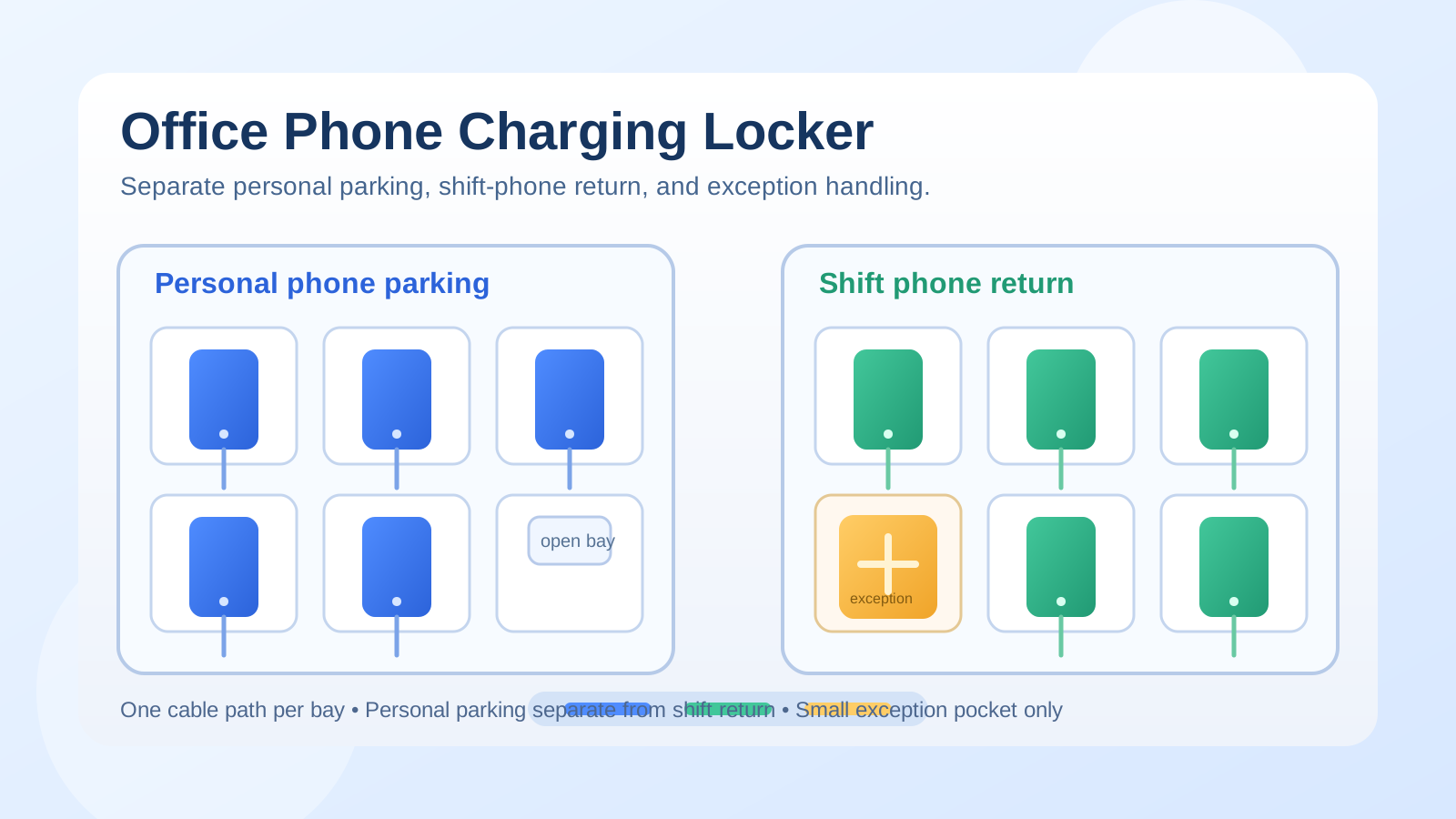
An office phone charging locker works better when you separate device ownership and charging status before you worry about capacity.
In practice, that usually means:
- one clear lane for personal phones parked during the work block
- one defined lane for shared or shift phones that must return charged
- one simple rule for chargers that stay with the locker versus chargers that leave with a person
- one small exception spot for unclaimed devices, missing cables, or damaged accessories
- one fast reset step that returns each bay to a ready state before the next shift or the next desk user arrives
That works better than adding more cords while every phone still looks equally temporary.
Why office phone lockers still turn into desk clutter
A phone locker sounds like a storage fix, but the mess usually comes from mixed purposes.
The same station may be trying to handle:
- personal phones people want nearby but not on the desk
- shared shift phones that need to charge between users
- temporary loaners or spare handsets
- charging bricks and cables for different connector types
- earbuds or smartwatches that sneak into the same space
- unclaimed devices waiting for someone to ask around
- low-battery phones that should not go back into circulation yet
When those states all share one small footprint, people stop trusting the locker. Then they keep devices on the desk “just for now,” drape cables over the side, or use the top of the unit as overflow storage.
Organize by phone role, not by empty slot
An empty charging bay invites random decisions.
A better setup gives each part of the locker a job people can understand at a glance:
| Zone | What belongs there | What stays out |
|---|---|---|
| personal parking lane | employee phones charging during the day | shared handsets, spare adapters, mystery accessories |
| shift-phone lane | office-owned phones that must return ready for the next user | personal devices and private chargers |
| support lane | built-in cables, one approved backup charger per connector type, and a short instruction card | old cords, unlabeled bricks, and unrelated tech |
| exception pocket | unclaimed phones, damaged cables, or devices waiting for follow-up | ready-to-use phones |
This matters because people are not really asking, Which slot is open?
They are asking, Can I trust this phone to be mine, charged, and easy to retrieve later?
Keep personal-device parking separate from shared-phone turnover
This is where many offices lose the setup.
Personal-device charging and shift-phone charging may happen in the same furniture, but they are not the same workflow.
A personal phone is usually parked for a block of time and retrieved by the same person. A shift phone is part of a handoff cycle. It may need to return to a specific bay, hit a minimum battery level, keep a labeled cable, and stay visible to the next person taking over.
If those two flows mix freely, the station becomes harder to read:
- staff are not sure whether a charging phone is office-owned or personal
- someone grabs the wrong cable because it looks interchangeable
- a shared phone gets buried between personal devices
- the next shift inherits a low battery because the ready phone was not clearly staged
Treat shared phones like operational equipment, not like extra personal devices that happen to charge in the same cabinet.
Match every bay to one cable path
Most phone-locker clutter is cable clutter wearing a different costume.
If two cords can drift into one slot, or one charger can serve three bays depending on the day, the system starts depending on memory. That is when adapters go missing, phones sit half-connected, and people leave extra chargers behind because nobody trusts the setup.
A better rule is simple:
- one charging path per bay
- one visible connector type per path
- no loose backup cable resting inside an active slot
- no spare brick living in front of the phone it supposedly supports
You do not need premium locker hardware for this. You need a setup where a misplaced cable looks wrong immediately.
Stop the top of the locker from becoming the real charging station
Many offices technically have a phone locker, but people still charge phones on top of it.
That usually happens because:
- the inside slots feel cramped or hard to reach
- a cable inside the locker is unreliable
- people want to glance at notifications without opening a door
- one bay is holding accessories instead of a phone
- there is no quick place for a device that will leave again in ten minutes
Once the top surface becomes active charging space, the locker stops being a locker. It becomes a shelf with doors below it.
If devices keep landing on top, the fix is usually not another reminder sign. It is making the inside path faster and the exception cases clearer.
Create one exception pocket instead of letting odd cases spread
Every phone locker sees a few edge cases:
- a phone with no owner label
- a damaged cable
- a dead shared handset that needs a battery check
- a device left after someone went home
- an adapter that no longer matches any active phone
If those edge cases sit inside the normal charging bays, they block the station and create quiet doubt around every slot nearby.
Give them one small exception pocket only.
That pocket can hold:
- one unclaimed device waiting for pickup
- one tagged bad cable or brick
- one shared phone that needs review before going back into the ready lane
- one short note about the issue
The rule is that exceptions should pause there briefly, not start colonizing the rest of the locker.
Keep desk surfaces out of the charging workflow
A lot of desk clutter starts before the desk itself.
If the phone locker is unreliable, people hedge by bringing the phone, backup cable, power bank, and earbuds to the workstation. Then the desk starts carrying personal charging needs, shared-device uncertainty, and side piles that have nothing to do with active work.
A stronger office rule is:
- personal phones either stay on the person or in the personal parking lane
- shared phones either stay in the shift-phone lane or in use
- chargers should not migrate to every shared desk as insurance
- devices waiting on pickup should not live on the nearest counter
That boundary helps because it keeps the locker area responsible for charging and the desk responsible for work.
Use a short return standard for shift phones
Shift phones create the most friction when the return step is vague.
The person ending the shift needs to know what “put it back” actually means.
A useful return standard is usually just four steps:
- place the phone in its assigned bay
- connect it to the fixed cable for that bay
- confirm the device is charging before closing the door or walking away
- move any issue to the exception pocket instead of leaving a mystery for the next person
That routine prevents a lot of next-shift frustration without turning the locker into a formal IT process.
Signs the locker is doing the wrong job
Your office phone charging locker probably needs adjustment if you keep seeing the same symptoms:
- phones charging on top of the unit instead of inside it
- shared desks collecting stray cables and power bricks
- employees asking whose phone is in a bay
- one connector type constantly missing or borrowed
- shift phones returning with low battery even though they were “put back”
- personal accessories filling slots that should hold devices
- unclaimed phones lingering for days with no clear holding place
Those are not only storage problems. They are workflow signals.
A simple layout that works in most offices
If you need a practical default, try this:
- left section: personal-phone parking bays
- right section: shared or shift-phone return bays
- center or side support: labeled cable map plus one approved backup charger by connector type
- small separate pocket: unclaimed or problem devices
- off the live locker: bulk spare cords, retired bricks, and unrelated accessories
That layout works because it respects the real questions people have during the day: where do I park my phone, where does the shift phone go back, and what do I do if something is wrong?
Where TidySnap helps
Phone lockers often look “basically fine” until you notice the pattern in a real photo: active phones charging on top, empty bays blocked by loose bricks, shared handsets mixed with personal devices, and cables drifting out of their slots. TidySnap helps you turn that real charging corner into a clearer layout for personal parking, shift-phone return, support gear, and problem-device handling based on the space you already have.
Final thought
A good office phone charging locker should communicate ownership and readiness, not only provide outlets.
When personal devices, shift phones, cables, and exceptions each have a visible home, phones stop spreading across shared desks, the next shift gets a device that is actually ready, and the whole workspace feels less improvised.