How to Organize an Office Paper Cutter Station Without Letting Trim Scraps Take Over
A paper cutter station gets messy because the work looks almost finished before it actually is.
Someone trims one sign insert and leaves the ruler out because another stack still needs a clean edge. A packet of handouts is lined up for one last cut, but the scraps stay on the table. A foam board label gets measured twice because the sample piece is mixed with the real one. Before long, the cutter is technically available, but the whole area feels blocked by almost-done work.
If you want to organize an office paper cutter station, the goal is not only to store the cutter neatly. The goal is to make measuring, trimming, checking, and scrap removal feel like one short finish sequence instead of four separate interruptions.
Quick answer
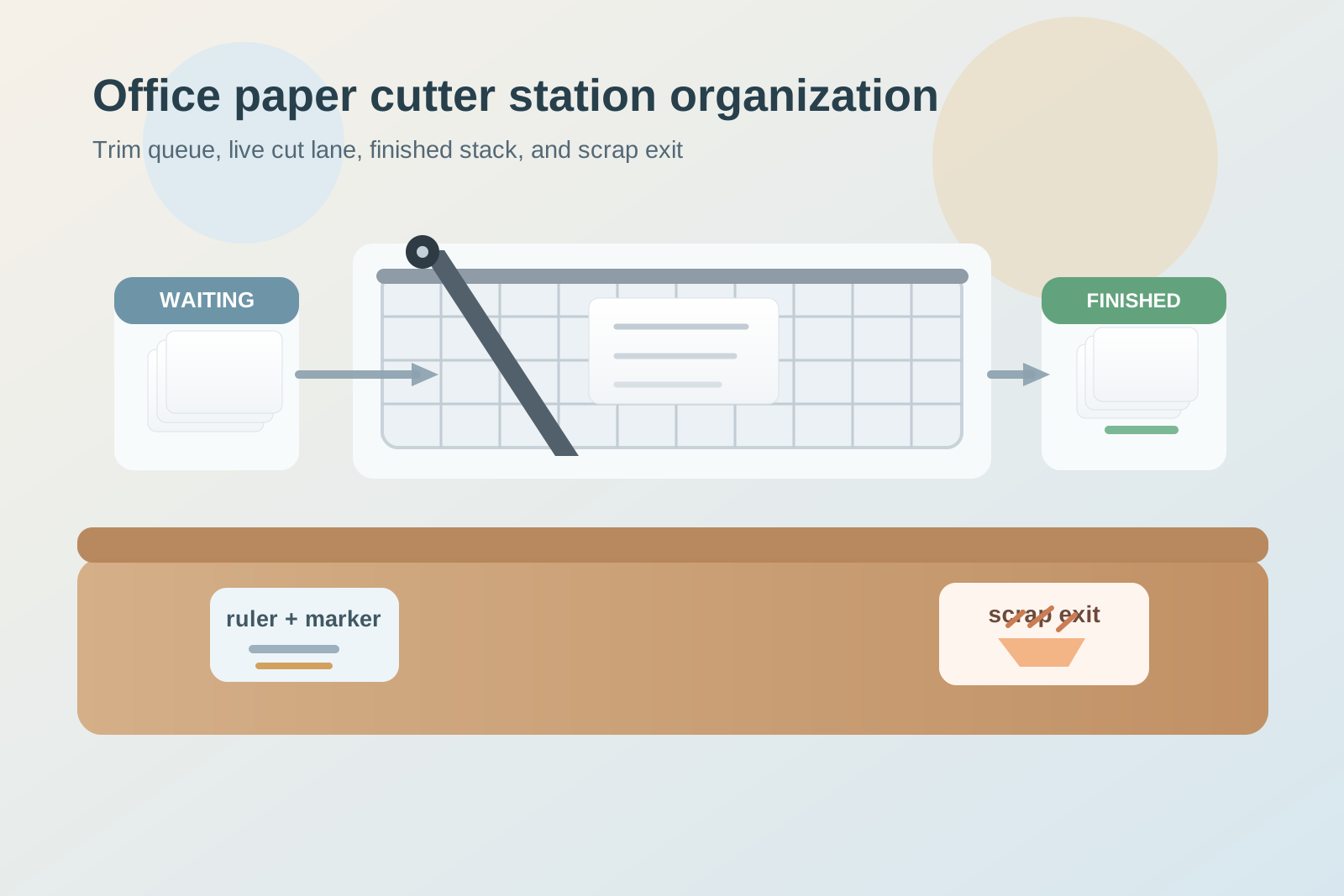
An office paper cutter station works better when you split it into four simple lanes: waiting to trim, cutting now, checked and finished, and scraps out. Keep the measurement tools tight, limit the in-progress stack to one live job, and give offcuts an immediate exit so the station does not stay covered in thin paper leftovers that make every new task feel crowded.
Why paper cutter stations become clutter magnets
A paper cutter usually supports short jobs, but short jobs create a surprising amount of visual mess.
The area may be handling:
- sign inserts that need edge cleanup
- printed handouts that need a final size adjustment
- badge backers or table cards waiting for a straight cut
- label sheets being trimmed apart
- test pieces used to check width or alignment
- long paper strips and corner scraps with no obvious exit
None of those items looks important enough to deserve a full workflow, so people improvise. They measure on one side, trim in the middle, stack finished pieces near the blade, and leave scraps wherever they fall. That is how a small finishing tool starts taking over a whole counter.
Separate trimming work from general copy-room overflow
A paper cutter station gets harder to use when it becomes the nearest flat surface for unrelated paper projects.
Printed packets from the copier, extra sign sleeves, old sample boards, and random office supplies often drift toward the cutter because the table already looks like a finishing area. Then every trim job starts with moving things out of the way.
A better rule is simple: the cutter station is for measuring, trimming, checking, and clearing. If an item does not support one of those steps right now, it should live somewhere else.
That distinction matters because trimming work needs clarity more than storage. People should be able to see what is waiting, what is active, and what is done without decoding a mixed pile.
Build the station around one active cut lane
Most cutter clutter starts when several small jobs overlap.
One person leaves a half-trimmed stack. Another adds three sign inserts that only need a quick edge cut. Someone else drops a printed sheet there because it might need resizing later. The station then looks busy even though no single job is large.
Keep one active cut lane only.
That means one stack or one set of pieces is allowed in the live cutting zone at a time. Everything else waits in a separate queue. This prevents the most common paper cutter mistake: mixing checked pieces, unchecked pieces, and not-yet-cut pieces into one hard-to-trust pile.
Give measuring tools a home that does not spread across the table
Paper cutter areas often feel messy because the support tools wander.
A ruler gets left diagonally across the base. The alignment sample sits on top of finished cards. A pencil, marker, or width note ends up near the blade because there was nowhere else to put it. Then the station looks complicated before the next job even starts.
You usually need only a very small support cluster:
- one ruler or straightedge
- one pencil or fine marker for temporary marks
- one alignment sample or size reference if your team uses repeat formats
- one small place for clips if trimmed sets need to stay together
Keep those items together to one side of the cutter instead of letting them float across the full surface. The station should feel like a finish point, not a drafting table.
Separate finished pieces from pieces that still need checking
The hardest part of trimming work is often not the cut itself. It is remembering whether the cut was already approved.
A sign insert may be trimmed but still need a quick check against a sleeve. A stack of handouts may look done but still need one side squared. If finished pieces and maybe-finished pieces touch each other, people slow down and start remeasuring everything.
Create one checked-and-finished lane that stays physically separate from the waiting stack. That lane can be very small. It only needs to hold the pieces that are ready to leave the station now.
This makes the station easier to trust. Nobody has to guess whether a piece near the cutter is done or still part of the live job.
Make scrap removal part of the workflow, not the cleanup later
Trim scraps are what make a cutter station feel permanently messy.
Long narrow strips, tiny corners, miscuts, test slivers, and packaging edges do not seem worth stopping for, so they stay on the table. Then the next job lands on top of them, and the whole surface starts looking dusty and crowded even when the real workload is small.
The fix is to treat scraps as a live output.
Give the station one immediate discard point for:
- thin offcuts
- failed test pieces
- misaligned trims that will not be reused
- empty packaging from sign stock or labels
If scraps need a second decision, they linger. If they have an obvious exit, the station stays readable between jobs.
Keep bulky stock one layer away from the blade
Another common problem is storing too much material right beside the cutter.
Cardstock packs, foam boards, large sign blanks, and unused printed stacks often stay next to the machine because they feel related. But bulky stock steals the space people need for alignment and finished-piece handling.
Keep only the current working quantity near the cutter. Backup stock should sit one layer away on a shelf, in a nearby vertical slot, or in a labeled cabinet. The cutting surface should support the job in progress, not hold the whole inventory for future trimming.
Watch for three paper-cutter failure patterns
1. The cutter becomes a maybe-later surface
That usually means too many jobs are being staged in the live cutting lane.
2. Finished pieces and test pieces start looking interchangeable
That usually means the checked-and-finished lane is missing or too vague.
3. The table looks messy even after the work is done
That usually means scrap removal is being treated as end-of-day cleanup instead of part of each cut.
A simple setup that works in most offices
If you need a practical default layout, use this pattern:
- left side or upstream side: waiting-to-trim stack
- center: cutter with one live cutting lane only
- right side or downstream side: checked-and-finished pieces
- nearest edge or bin: scrap exit point
- small side spot: ruler, marker, and one size reference
This works because it matches the real sequence. Queue. Cut. Check. Clear the scraps. Then the next job can start without rebuilding the whole station.
Where TidySnap helps
Paper cutter clutter is easy to overlook because it often looks like active production instead of mess. One photo can show the real problem quickly: bulky stock crowding the blade, trimmed pieces mixed with waiting pieces, and scrap strips staying on the same surface as finished work. TidySnap can help you review the cutter area and nearby counter so you can separate live trimming, support tools, finished pieces, and scrap flow with less guesswork.
Final thought
A good office paper cutter station does not only make straighter cuts. It makes finishing work easier to complete.
When waiting pieces, active trimming, finished pieces, and scraps each have a clear lane, the station stops feeling like a pile of almost-done paper projects. It becomes a fast finishing point that supports the rest of the office instead of slowing it down.