How to Organize an Office Laminator Station So Pouches, Cooling Sheets, and Reprints Stop Taking Over
A laminator station rarely looks messy at the exact moment you start using it.
It gets messy in the minutes after that. A pouch wrapper stays on the table because another badge sign still needs to run through. A hot sheet gets set aside to cool, then another one lands on top of it. Someone brings over three more pages, but two need trimming first and one has to be reprinted because the margin shifted inside the pouch. By the time the machine is free again, the whole surface is carrying a mix of ready items, warm output, rejects, and supplies that all look temporarily important.
If you want to organize an office laminator station, the goal is not to make the machine corner look minimal for one photo. The goal is to make loading, sealing, cooling, checking, and clearing feel like one clean sequence instead of a pile of half-finished plastic-covered paper.
Quick answer
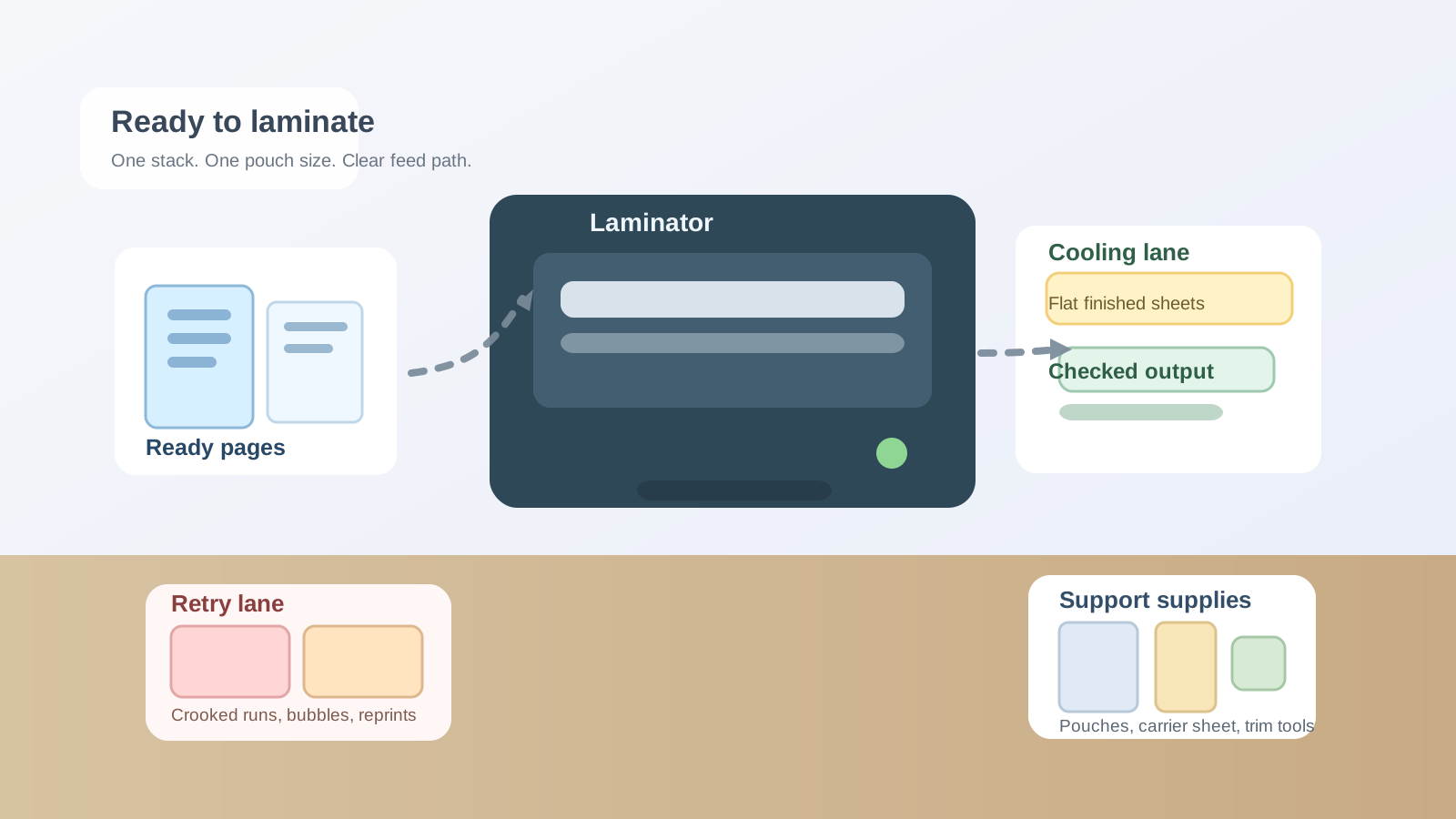
An office laminator station works better when you separate it into five simple zones:
- ready to laminate for the next clean stack of pages and pouches
- machine space for feeding and retrieving safely
- cooling space for finished sheets that should lie flat for a minute
- reprint or retry space for crooked, cloudy, or wrong-size pieces
- support supplies for extra pouches, carriers, and trimming tools kept nearby but not on the feed path
That setup keeps the laminator from becoming a hot holding area for every unfinished sign, handout, and backing scrap in the room.
Why laminator stations turn into clutter faster than expected
A laminator creates a workflow that is short but awkward.
The items involved are usually thin, slippery, and hard to stack neatly while they are in motion. The station may be handling:
- loose laminating pouches in more than one size
- printed sheets that are ready now
- sheets that still need one correction first
- hot output that should cool flat
- crooked or cloudy pieces waiting for a reprint decision
- trimming tools for final edge cleanup
- empty pouch sleeves, misfeeds, and backing scraps
That is why a laminator area can feel more chaotic than a printer area of the same size. The clutter is not bulky. It is process clutter. Everything looks like it belongs for one more minute.
Stop treating the laminator table like extra copy-room surface
The fastest way to lose control of a laminator station is to let it become the nearest flat place for unrelated paper tasks.
Someone drops off sign inserts that still need editing. A stack of forms waits there because lamination will happen later. A paper cutter ruler gets parked beside the machine. Soon the laminator area is doing intake, printing overflow, trimming prep, and finishing all at once.
A better rule is simple: if an item is not about to be laminated, cooling, or being checked after lamination, it should not live on the laminator surface.
That one rule removes a surprising amount of visual noise.
Keep the feed path almost empty
A laminator needs clearer breathing room than people expect.
If the front edge is crowded, pouches catch on other paper. If the exit edge is blocked, finished sheets curl against whatever was left behind. If a pile of spare pouches sits too close to the machine, people start balancing active pages on top of backup stock.
Protect the feed path on purpose:
- only the next item to laminate should sit in front of the machine
- only the sheet that just came out should land directly behind it
- tools, backups, and scraps should not share the same narrow lane
This matters because the laminator is one of those office tools that becomes annoying long before it becomes full. A few extra objects in the wrong place can make the whole station feel risky and slow.
Give cooling sheets their own landing area
Cooling space is the part most offices forget.
Freshly laminated pages often need a minute to flatten, especially if they are small signs, labels, menus, badges, or sheets people immediately want to stack. Without a cooling lane, finished pieces get dropped anywhere: across the paper cutter, on top of fresh pouches, over the instruction note, or halfway off the table.
A dedicated cooling area fixes that.
It does not need to be large. It just needs to be clearly separate from the ready stack. That way people can tell the difference between:
- pages waiting to go in
- pages that just came out
- pages that failed and need another try
Without that separation, the station starts feeling confusing even when nobody is rushing.
Separate bad laminations from good ones immediately
Crooked inserts and cloudy runs create more mess than the successful jobs do.
The problem is not only the wasted pouch. It is the hesitation afterward. Someone is not sure whether the sheet is good enough. Another person thinks it only needs a trim. A third leaves it beside the machine because the document may need to be printed again.
Create one small retry lane for:
- off-center pages
- wrinkled or bubbled output
- wrong-size laminations
- pages missing a step before reprint
If a piece is not ready to hand out or post, it should not stay mixed with successful output. That one distinction keeps the station readable.
Shrink the visible pouch supply
Laminator stations feel messy when too much backup stock stays open.
It usually starts with good intentions. People want quick access to letter pouches, badge pouches, menu sleeves, or one carrier sheet. But once several open stacks are visible at once, the table becomes a supply display instead of a work surface.
Keep a small working quantity near the machine and move the rest one step away.
That might mean:
- one active pouch size near the feed side
- backup sizes in a drawer or upright file nearby
- trimming tools stored to the side, not on the exit path
- one clearly labeled place for carrier sheets or specialty sleeves
The station should support the next few laminations, not the next month of supply needs.
Do not let trimming steal the laminator zone
Laminated pieces often need edge cleanup, but trimming is a separate step.
When scissors, rulers, corner rounders, and cutoff scraps stay in the same live lane as the laminator, the finishing workflow collapses into one cluttered rectangle. That is when half-trimmed signs and hot output start overlapping.
If trimming happens often, give it a side position rather than letting it take over the machine zone. The laminator area should answer one question first: what is feeding, cooling, or waiting for reprint right now?
Build a simple reset after each batch
You do not need a full reorganization every time someone laminates three sheets.
You do need a reset small enough that people will actually do it.
A useful one-minute reset looks like this:
- remove empty sleeves and backing scraps
- move finished cooled pieces out of the station
- put failed pieces into the retry lane or discard them
- return extra pouch sizes to the support area
- leave only one ready stack for the next run
That short reset keeps the next person from walking into a table that still looks mid-project.
Common patterns that make laminator stations frustrating
The machine area becomes a waiting room for unfinished print jobs
That usually means pages are arriving before they are truly ready to laminate.
Finished sheets and retry sheets start touching each other
That usually means cooling space and reprint space are not separated.
Several pouch sizes stay open on the table all day
That usually means backup stock is being stored in the active work zone.
Trimming scraps linger beside the exit slot
That usually means the lamination step and the trimming step are not being treated as separate tasks.
A practical laminator layout for most offices
If you need a simple default layout, try this:
- front left or upstream side: one ready stack and one active pouch size
- center: laminator with a clean feed path
- back or downstream side: cooling lane for finished sheets
- side lane: retry space for rejects and reprints
- drawer, file box, or small nearby shelf: backup pouches, carrier sheets, and trimming tools
That arrangement works because it follows the real motion of the task instead of treating the table like general storage.
Where TidySnap helps
Laminator clutter is easy to underestimate because it often looks like active finishing work instead of real disorder. One photo usually reveals the pattern quickly: too many pouch sizes out, no place for cooling output, rejected pieces mixed with good ones, and trimming tools taking over the same table. TidySnap can help you review the actual station and set clearer lanes for ready pages, machine space, cooling output, reprints, and support supplies.
Final thought
A well-organized laminator station does not only look cleaner. It removes hesitation.
When staff can tell what is ready, what is hot, what failed, and what should leave the table now, lamination becomes a quick finishing step instead of a messy little production area that keeps spreading across the office.