How to Organize a Shared Desk Reset Station for Wipes, Keyboards, and End-of-Day Cleanup
A shared desk can look almost clean and still feel annoying to inherit.
There is a keyboard on the surface, but nobody knows whether it belongs there or was left behind. A packet of wipes is empty. A used cleaning cloth is draped over the monitor stand because someone meant to throw it away later. One cable is still plugged in from the previous person. A mouse pad is crooked beside a sticky note that has nothing to do with the next shift.
That is the kind of mess that slows people down before they even start working.
If you need to organize a shared desk reset station, the goal is not creating a bigger cleaning caddy. The goal is making end-of-day cleanup, shared-equipment return, and next-user readiness happen in one short flow that people can follow without thinking much about it.
Quick answer
A shared desk reset station usually works better when it keeps cleanup supplies, approved shared peripherals, and one short reset routine in the same small zone.
In practice, that usually means:
- one clear spot for wipes, spray, and discard items
- one defined home for the keyboard, mouse, and other desk-approved shared gear
- one small lane for items that were left behind or need review
- one short end-of-day checklist that resets the desk before the next person arrives
- one rule for what should stay at the desk and what should leave with the user
That usually helps more than reminding people to clean up while the actual tools and decisions stay scattered.
Why shared desks keep feeling half-reset
Most shared-desk clutter is not big clutter.
It is the leftovers from tiny unresolved actions:
- a used wipe with no nearby discard spot
- a keyboard pushed aside during laptop work
- a borrowed charger that never made it back to its real home
- a mouse or adapter that might be shared, or might belong to someone
- a quick wipe-down step that gets skipped because supplies are across the room
- a note, badge, or cup that nobody wants to claim
That is why the desk can look mostly fine in a photo but still feel unreliable in real use.
The next person is not only seeing objects. They are decoding status.
Build the station around the reset sequence
A useful shared desk reset station should support the actual order people follow at the end of the day.
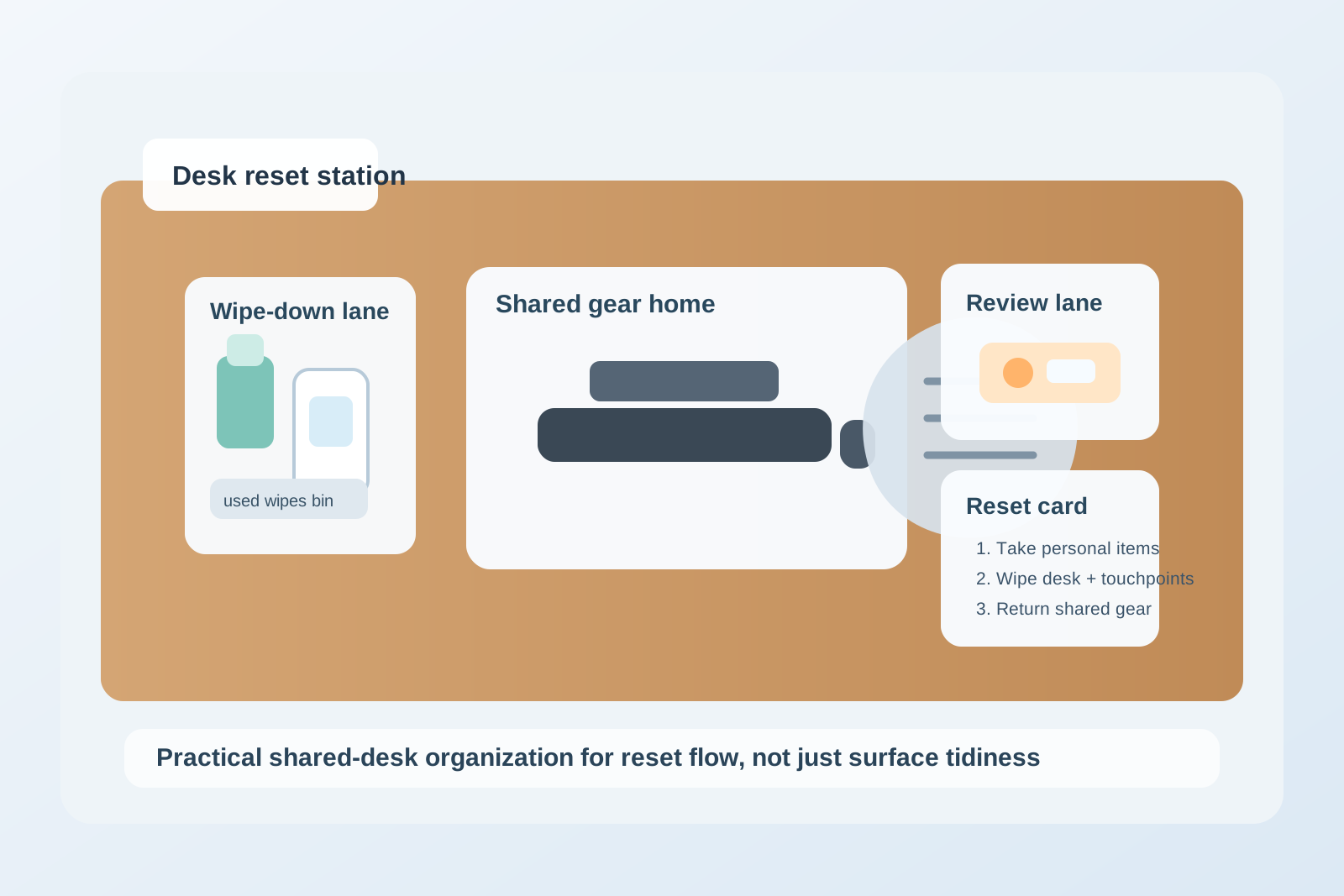
| Zone | What belongs there | What should stay out |
|---|---|---|
| wipe-down lane | approved wipes, screen-safe cleaner if used, one cloth, one small trash point | random office supplies and spare tech |
| shared gear home | the keyboard, mouse, dock cable, or other approved desk equipment that should remain for the next user | personal chargers, headsets, notebooks, food, and badges |
| review lane | items left behind, unclear accessories, or gear with a problem note | ready shared gear |
| reset prompt | one short checklist or card showing the closeout steps | long policy printouts nobody reads |
This matters because people are not asking, Where does the cleaning kit live?
They are asking, What do I need to do right now so this desk is actually ready for the next person?
Keep cleaning supplies close enough to use immediately
A lot of offices technically provide desk-cleaning supplies, but they place them far enough away that people skip the last step when they are rushing out.
If the wipes are in a storage cabinet down the hall, or the spray bottle lives at reception, cleanup turns into optional effort.
A better setup is simpler:
- keep the reset supplies within the same reach zone as the shared desk bank
- stock only the items people are expected to use regularly
- include a discard spot so used wipes do not stay on the desk edge
- avoid mixing the cleaning lane with general office storage
The station does not need to be large.
It needs to be faster than leaving the mess behind.
Separate approved shared gear from personal leftovers
This is where many shared desks break down.
One office wants the keyboard and mouse to stay. Another wants only the dock cable to remain. Sometimes people leave a spare laptop stand, a headset, or an extra charger because it feels helpful in the moment. A week later, nobody can tell what belongs to the desk and what is just accumulated drift.
A stronger rule is simple:
- approved shared gear gets one obvious home
- personal gear leaves with the user every time
- unclear leftovers go to review, not into the ready setup
That keeps the desk from becoming a negotiation between official setup and accidental storage.
Give left-behind items a holding lane instead of letting them haunt the desk
Shared desks collect small mystery items fast.
It might be a dongle, an adapter, a notebook, a sweater, a mouse with no label, or a sticky note that no longer means anything. If those items stay on the desk because someone might come back for them, the desk starts every morning with unresolved clutter.
Use one small review lane for:
- items clearly left behind
- accessories with no obvious owner
- shared gear that needs a quick check
- anything that should not stay in the ready desk setup
Keep that lane intentionally small. If it fills up, the office needs a same-day decision, not a larger pile.
Treat the keyboard area as part of the reset, not just part of the desk
Keyboards and mice create a specific kind of shared-desk friction because they sit at the center of the setup.
When they are misaligned, dusty, tangled into cables, or mixed with personal gear, the desk feels used even after someone tries to tidy it.
A better reset standard is usually very basic:
- center the keyboard if it stays with the desk
- leave the mouse in its normal spot
- return one dock or charging cable to the same side every time
- remove loose papers, wrappers, and temporary notes from the typing area
- do not leave backup peripherals on the surface just because there is room
That kind of consistency makes the desk feel ready faster than a more decorative setup ever will.
Keep the reset checklist short enough that people will actually do it
The best shared-desk routines are not detailed.
They are repeatable.
A practical checklist might be:
- take all personal items with you
- wipe the desk and touch surfaces your office expects people to clean
- return the keyboard, mouse, and shared cable to their marked spots
- throw away used wipes and remove cups, notes, and trash
- move unclear leftovers to the review lane instead of leaving them on the desk
That usually works better than a longer policy nobody follows at 5:42 PM.
Signs the reset station is doing the wrong job
A shared desk reset station probably needs adjustment if you keep seeing the same problems:
- used wipes left on desks or monitor stands
- keyboards shifted aside with no standard resting spot
- personal chargers staying plugged in overnight
- people asking whether a mouse or adapter belongs to the desk
- the first person in the morning re-cleaning every surface from scratch
- small leftovers gathering at the back edge of each workstation
Those are not just etiquette issues.
They usually mean the reset tools and decisions are not living in one clear place.
Where TidySnap helps
Shared desks are easy to misjudge because the clutter often looks minor item by item. In a real photo, though, the pattern usually shows up fast: cleaning supplies too far away, shared gear with no clear home, and leftovers sitting where the next person has to decode them. TidySnap can help you test a clearer desk-reset layout before the next round of hot-desk cleanup turns into another vague office reminder.
FAQ
What should stay at a shared desk overnight?
Only the gear your office has clearly decided belongs to that desk, such as the standard keyboard, mouse, dock cable, or other approved shared equipment.
What should go in a shared desk reset station?
Keep only the supplies and cues needed to reset the desk quickly: wipes, cleaner if approved, a discard point, shared-gear homes, and a small review lane.
Should left-behind items stay on the desk until someone claims them?
Usually no. Move them into one review lane so the desk can return to a ready state without losing track of what was found.
Why do shared desks still feel messy even when people clean them?
Because the real problem is often status confusion. If wipes, shared gear, personal leftovers, and unclear items all end up in the same area, the desk still feels unresolved to the next person.