How to Organize a Desk for Handwritten Invoices Without Covering the Keyboard Zone
Handwritten invoice work creates a specific kind of desk mess.
It is not the same as general paperwork clutter, and it is not quite the same as bookkeeping with fully digital records. You are often switching between a written invoice pad or carbonless form, a customer note, one or two supporting papers, a calculator or total check, and the keyboard you still need for entry, confirmation, or lookup. The desk stops behaving like a normal workstation because writing space and computer space start competing with each other.
If you want to organize a desk for handwritten invoices, the goal is not making every sheet disappear. The goal is creating a stable billing lane where you can write clearly, check totals, and key details into the computer without covering the keyboard zone or losing track of which invoice is still active.
Quick answer
To organize a desk for handwritten invoices without letting paper take over:
- keep one clear writing zone for the invoice pad or current sheet
- separate source paperwork from the invoice you are filling out now
- give totals, tax checks, or calculator notes one narrow support spot instead of letting them drift across the keyboard area
- keep finished invoices and problem items in different exit spots
- protect the keyboard zone so digital entry stays available during the billing task
That setup works because handwritten invoice work is really a small sequence: pull the details, write the invoice, verify the numbers, enter or confirm the record, and move the page out.
Why handwritten invoice work spreads so fast
A handwritten invoice usually needs more surface area than people expect.
You may be dealing with:
- the current invoice pad or duplicate form
- a customer order, service note, or job sheet
- rates, item counts, or tax information
- a calculator or one handwritten total note
- an envelope, clip, or receipt tied to the job
- one completed invoice that still needs filing, scanning, or handoff
- one incomplete invoice waiting on a missing number
None of that looks dramatic by itself. The problem is that every piece feels active for one more minute. When all of those states share the same area, the desk stops telling you what is current, what is reference, and what is already done.
Build the desk around writing first, then entry
A lot of people try to keep the monitor and keyboard as the permanent center of the setup, then squeeze invoice writing around them. That is usually why the work feels cramped.
For handwritten invoices, the active center should belong to the page you are writing now. The computer still matters, but it should support the process from the side or just behind the writing lane rather than forcing the invoice form onto half a desk edge.
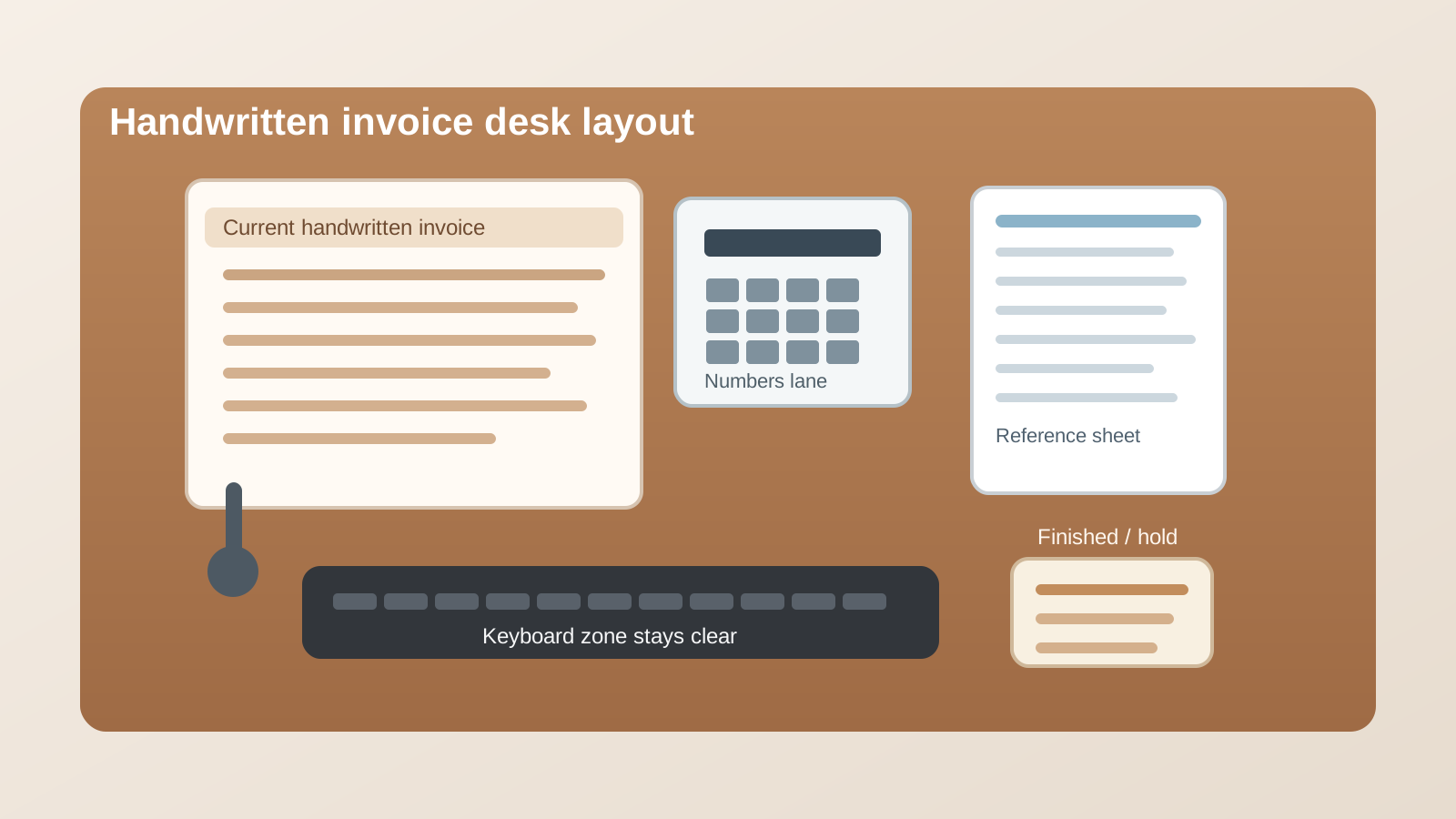
A practical layout looks like this:
| Zone | What belongs there | What should stay out |
|---|---|---|
| writing zone | the current invoice pad or single active form | finished invoices, loose backup paper, unopened mail |
| reference zone | one job sheet, order note, or source page tied to the current invoice | old batches, random admin paper |
| numbers zone | calculator, tax note, rate card, or one short total sheet | pens, clips, and unrelated tools |
| keyboard zone | keyboard and mouse kept clear for entry and lookup | active paper stacks, carbon copies, sticky-note drift |
| exit zone | finished invoices or items waiting on one missing detail | new incoming paperwork |
This works because it reflects the real workflow instead of pretending billing is just another typing task.
Keep the invoice pad flat and fully supported
Handwritten billing gets sloppy when the page is balanced on too little space.
If the invoice pad hangs over the keyboard, overlaps the mouse path, or sits on top of other forms, you end up writing around obstacles. That leads to crooked entries, missed lines, and more rechecking later.
The writing zone should be large enough for the full active page, plus a little room for your hand to rest naturally. Even if the desk is small, it is better to shrink the number of papers in reach than to shrink the writing surface itself.
If you use carbonless duplicates or multi-part forms, this matters even more. Those forms are harder to manage when they slide around or pick up pressure from objects underneath them.
Stop letting reference paperwork sit under the active invoice
One of the most common invoice habits is tucking the order note, service slip, or item list partly under the invoice form.
It feels efficient in the moment, but it creates two problems:
- the active page becomes uneven and harder to write on
- the reference paper disappears just enough that you keep lifting, sliding, and re-reading it
A better approach is to keep one reference page beside the invoice, not beneath it. That lets you glance sideways for quantities, dates, or customer details without constantly rebuilding the stack.
If you need more than one supporting page, keep only the current one in the reference zone and move the rest out of arm’s reach until needed.
Give totals and tax checks one narrow support lane
Number-checking creates more clutter than the invoice form itself.
A calculator, a tax note, a discount reminder, or a short pricing sheet often ends up drifting into the writing zone because it feels important. Then the desk turns into a patchwork of overlapping number references.
Keep those items in one narrow numbers zone only. That lane can hold:
- the calculator you are using now
- one small note with a subtotal or tax check
- one short rate reference if the pricing is not already obvious
What should not live there:
- a pile of finished receipts
- extra forms from other customers
- the general office notepad
- backup supply items like stamps, clips, or envelopes
The goal is to keep calculation support visible without letting it become a second paperwork pile.
Protect the keyboard zone on purpose
This is the part most people skip.
If the keyboard area is allowed to become temporary paper parking, digital entry gets delayed until the handwritten work is completely finished. Then a quick invoice task becomes two separate cleanup steps: first clear the keyboard, then enter the details.
A better rule is simple: the keyboard zone stays available during invoice work, not after it.
That means:
- no resting the invoice pad across the keys
- no stacking completed forms in front of the space bar
- no parking calculator tape or notes beside the mouse
- no letting receipts collect along the front edge of the keyboard
When the keyboard stays readable, you can enter totals, check a record, or send a confirmation in the middle of the process without resetting the whole desk.
Separate finished invoices from incomplete ones immediately
Handwritten invoice clutter gets dangerous when done work and blocked work look the same.
Maybe one invoice is finished and ready for filing. Another still needs a part number. Another needs a signature or a quick call before you can finalize it. If all three sit in one stack, you have to re-open each one to remember its status.
Use two exit states only:
- finished for invoices that are complete and ready for the next normal step
- hold for anything waiting on information, approval, or correction
That is enough for most desks. The moment an invoice stops being active, move it into one of those two places. Do not let it stay in the writing zone just because you might look at it again.
Keep incoming paperwork away from the billing lane
A billing desk often attracts other paper because it already looks like a paperwork surface.
Mail lands there. Receipts land there. A coworker drops off one extra form because you are already working with paper anyway. That is how a focused invoice setup turns into a mixed admin pile.
If possible, keep the handwritten invoice area for billing work only. New incoming documents should land somewhere else unless they directly belong to the invoice you are writing now.
This matters because handwritten invoice work already carries enough short-term detail. It does not need surprise paper mixed in with customer numbers and totals.
A simple reset for the end of each billing batch
When you finish a batch of handwritten invoices, do a fast reset:
- move finished invoices to their next storage or handoff point
- move incomplete invoices into the hold spot with one visible note about what is missing
- clear the reference zone of old service slips or order pages
- return the calculator or rate sheet to its fixed lane
- reopen the keyboard zone completely before switching to other work
That reset keeps the desk from carrying billing clutter into the next task.
Common mistakes that make invoice desks feel worse
A few habits create most of the mess:
- writing on top of a mixed stack instead of one supported page
- letting finished invoices stay near the active form
- mixing reference documents from different customers together
- using the keyboard area as a temporary shelf
- keeping too many pricing notes in sight at once
- leaving hold items inside the same pile as clean work
Most invoice clutter is not caused by too few organizers. It is caused by too many paper states sharing one work lane.
Final thought
The best handwritten invoice desk is not paper-free. It is readable.
When the writing zone, reference page, numbers lane, keyboard zone, and exit spots each have a clear role, invoice work feels faster and less mentally sticky. You spend less time rechecking the pile and more time finishing the actual billing.
If you want a faster way to reset a paperwork-heavy desk, use TidySnap to turn a real workspace photo into practical organization advice built around how the surface is actually being used.