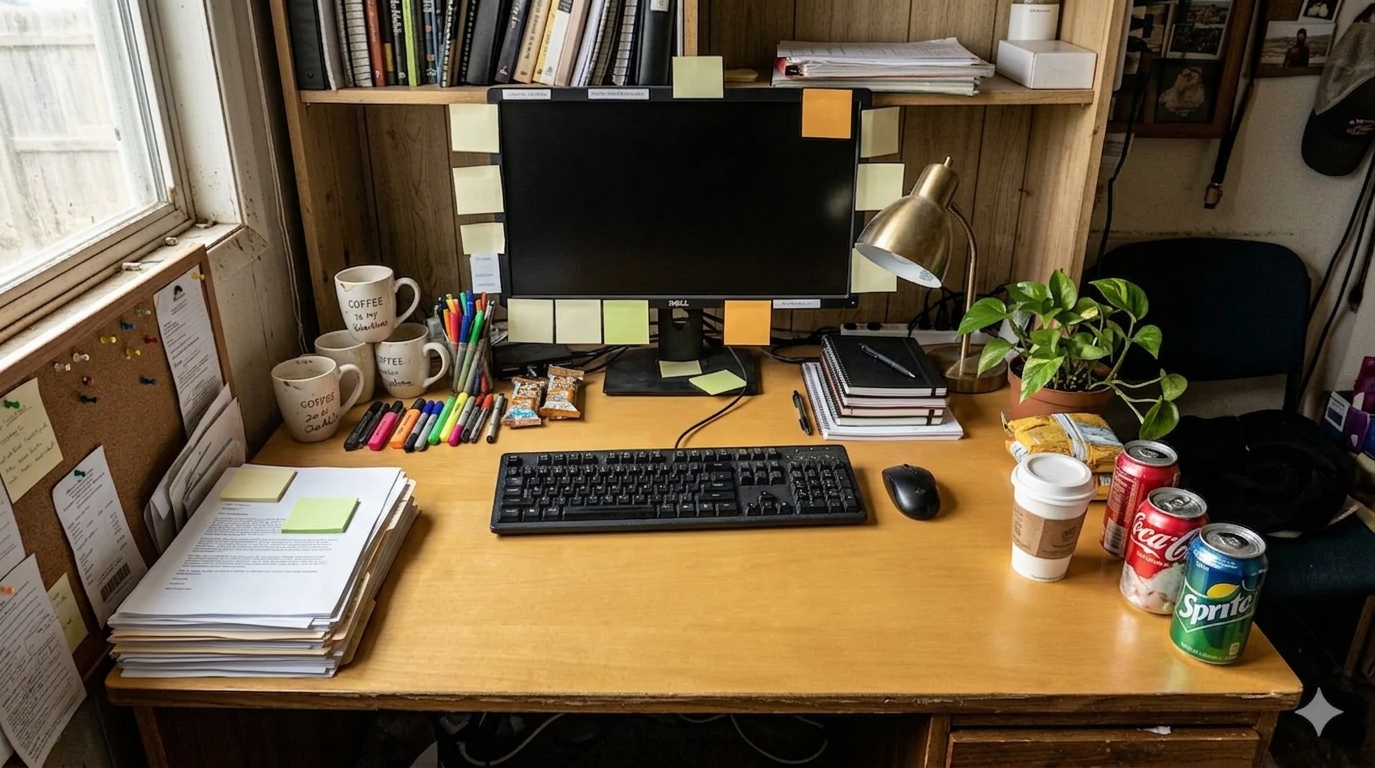
How to Organize a Desk Covered in Sticky Notes Without Losing What Matters
A sticky-note desk usually does not start messy. It starts useful.
One note holds a phone number. Another marks a deadline. A third keeps a question in sight until the next meeting. Then a few more land on the monitor, the lamp base, the notebook edge, and the wall beside the desk. Nothing feels random because every note came from a real need. The trouble shows up later, when the desk stops telling you what matters now and starts showing everything at once.
Quick Answer
If your desk is covered in sticky notes, the fastest fix is to sort them by job before you try to tidy them by location.
- keep only today’s active notes in your immediate sightline
- move reference notes out of the center work area
- combine duplicate reminders into one clearer note
- give incoming notes one landing spot instead of several
- stop using the monitor frame as overflow storage
- keep blank notes nearby, but keep filled notes limited
- do a short end-of-day sweep so old notes stop pretending to be urgent
A sticky-note system works best when it helps you notice the next step, not every step you have ever written down.
The Real Problem With Sticky Notes Is Decision Traffic
Sticky notes create clutter differently from cables, paper piles, or extra gear. They do not usually block the desk physically. They block it mentally.
When too many notes stay visible, the desk starts creating constant low-level decisions:
- is this still current?
- do I need to act on this today?
- why do I have the same reminder in two places?
- is this note unfinished, or have I just stopped trusting my system?
That is why a sticky-note-heavy desk can feel stressful even when the surface itself is not packed with objects.
Use a Four-Group Reset Instead of Peeling Everything Off at Once
A full wipe can feel satisfying for about ten minutes, but it often fails because useful reminders disappear with the clutter. A better reset is to sort every note into four groups first.
| Group | What belongs there | What to do with it |
|---|---|---|
| do today | notes tied to current tasks or appointments | keep visible near your main work zone |
| this week | reminders that matter soon but not right now | move to one side strip, notebook page, or task list |
| reference | phone numbers, measurements, links, codes, names | store in one stable place off the central sightline |
| done or unclear | old reminders, duplicates, half-legible scraps | throw away or rewrite once if still needed |
This approach keeps you from making the classic mistake of treating every sticky note like it deserves equal urgency.
Pick One Main Sightline
A lot of sticky-note clutter comes from spreading reminders across every available surface.
That often means notes end up on:
- the bottom edge of the monitor
- the desk right in front of the keyboard
- the lamp base
- the wall beside the desk
- a notebook cover
- the edge of a shelf
Once the notes are everywhere, your eyes have to scan everywhere too.
Choose one main sightline instead. For most desks, that is one of these:
- a narrow strip beside the monitor
- one corner of the desk above the support zone
- one notebook page used as the current reminder board
The goal is not to hide reminders. The goal is to stop the whole room from acting like a reminder surface.
Keep the Center for Work, Not Reminder Storage
Sticky notes often creep into the most valuable part of the desk: the area where your hands, keyboard, notebook, and active paper need to move comfortably.
If notes are sitting:
- under your wrists
- below the keyboard line
- on top of active documents
- across the lower part of the monitor
- beside the mouse path
then they are no longer helping memory. They are interrupting work.
A better rule is simple: the center of the desk should hold the task itself, not a museum of reminders about other tasks.
Rewrite Before You Reduce
People often keep too many sticky notes because each one feels too small to throw away and too important to forget.
The fix is usually not just removing notes. It is rewriting them more clearly.
For example:
- three separate notes about one meeting can become one note with time, decision, and follow-up
- two notes with the same reminder can become one cleaner version
- a vague note like
email Sambecomes more useful asemail Sam about invoice by 3 pm
Rewriting sounds slower, but it reduces noise fast because it turns scattered memory prompts into actual instructions.
Give New Notes a Landing Zone
Some desks stay trapped in sticky-note clutter because every new note gets placed wherever the hand happens to be.
Instead, create one incoming note spot only. That might be:
- one top-right corner of the desk
- one corner of a notebook page
- one small section of the wall or board near the desk
- one shallow tray where loose notes wait to be processed
That way, the desk does not keep growing fresh reminder islands in different places.
A Better Layout for Common Sticky-Note Patterns
If your notes live on the monitor
Keep only the reminders tied to the current work block there. Move reference info, phone numbers, and repeating reminders elsewhere before the monitor turns into a border of old decisions.
If your notes spread across paper and notebooks
Choose one current notebook page for temporary reminders, and stop leaving loose notes tucked into multiple stacks. The page becomes easier to review than five separate scraps.
If you work with admin tasks, forms, or calls
Use sticky notes for today’s actions only. Names, account details, and longer-term references should move into a document, task manager, or dedicated reference page once the immediate task is over.
If your desk feels mentally loud, not physically crowded
Reduce visible note count before you buy anything. The visual pressure usually comes from too many messages in view, not from a lack of containers.
Where TidySnap Helps
Sticky-note clutter is hard to judge from memory because you get used to seeing it.
A real photo makes it easier to spot:
- which notes are sitting in the active work zone
- where reminders have spread into too many surfaces
- whether the monitor area is carrying too much visual weight
- which objects are supporting work and which ones are only holding unfinished decisions
TidySnap helps you turn that photo into a layout plan for your actual desk, not an idealized one. That makes it easier to keep reminders visible without letting them take over the whole setup.
A 7-Minute Sticky-Note Reset
- collect every loose sticky note into one stack
- keep only the notes tied to today’s actual tasks out in view
- rewrite unclear or duplicated notes into one cleaner version
- move reference notes off the center sightline
- clear the lower monitor edge and keyboard area
- assign one landing zone for new notes
- throw away anything finished, expired, or unreadable
This reset works because it reduces message overload before it asks you to create a prettier system.
FAQ
How many sticky notes should stay visible on a desk?
There is no perfect number, but the visible set should stay small enough that you can understand it at a glance. If you have to scan around the desk to interpret your reminders, there are too many.
Should sticky notes go on the monitor?
They can, but only in a limited way. A few current reminders may work there. A full ring of notes around the screen usually becomes visual drag instead of support.
What should I do with reference notes I still need?
Move them into one stable reference home such as a notebook page, digital note, side card, or small holder near the desk. They do not need to sit in the middle of your sightline all day.
What if I keep writing new sticky notes for the same task?
That usually means the reminder is too vague or your system is split across too many places. Rewrite the task more clearly and give it one reliable home instead of recreating it over and over.